
Automation tool (Selenium) · Python
Selenium basics and browser control
WebDriver architecture, starting a browser, navigation and closing it.
Learn: Selenium basics in Python: how WebDriver works and controls the browser7 minute read
Selenium is a free, open-source tool (its code is public and anyone can use it) that controls a real web browser from code. Your Python script says "open this page, type here, click there", and Selenium makes the browser do it. The first questions in an automation interview check three things: that you know what Selenium is and what it is not, how your Python code talks to the browser, and how you start and stop a browser without leaving it running. This page covers Selenium 4 in Python.
What Selenium is made of
WebDriver is the API you call from code, installed with pip install selenium. Selenium Grid runs browsers on other machines, so tests can run in parallel. Selenium IDE is a browser extension that records and plays back steps. Selenium Manager, shipped since version 4.6, finds or downloads a matching browser driver when you have not set one up.
Selenium is not a test runner. It has no test discovery (finding your tests automatically), no fixtures (setup and clean-up functions that run around a test) and no reports. Pair it with pytest, a test library that does these jobs.
How a command reaches the browser
- The
seleniumpackage (the client library, also called the language binding) turns your call, for exampledriver.find_element(By.ID, "user"), into an HTTP request with a JSON body. HTTP is the way programs send requests over a network, and JSON is a plain-text format for data. - The request follows the W3C WebDriver protocol, the web standard for controlling a browser. All major browsers support it. Selenium 4 sends its normal commands (find an element, click, type, read text) this way. A few extra features, such as DevTools access (Chrome DevTools Protocol) and event listening (WebDriver BiDi), use a separate connection that stays open next to it.
- A browser driver, a small local server program such as chromedriver or geckodriver, receives the request.
- The driver controls the browser and returns a JSON response, for example an id for the element it found.
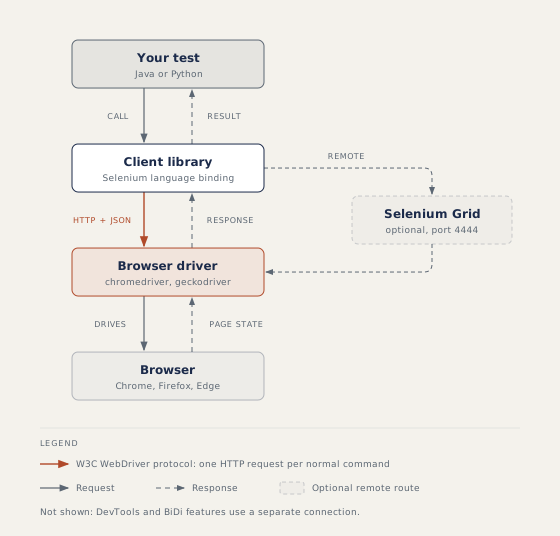
Each call is a round trip, so fewer and better lookups make tests faster and steadier. In the code, webdriver.Chrome is a class built on the remote WebDriver class in selenium.webdriver.remote.webdriver. webdriver.Remote uses the same base class but sends the requests to Selenium Grid, so tests do not change.
A first script, step by step
from selenium import webdriver

options = webdriver.ChromeOptions()
options.add_argument("--headless=new")
options.add_argument("--window-size=1920,1080")

driver = webdriver.Chrome(options=options)
try:
    driver.get("https://example.com")
    print(driver.title)
finally:
    driver.quit()
- Build the browser settings with an options object. Headless means no visible window, which is normal on build servers (machines that run your tests automatically, with no screen).
- Set a window size, because the default headless window is small and pages may hide menus.
- Start Chrome. Selenium Manager finds the driver if needed.
get()opens the page and waits until it has loaded.quit()infinallyruns even when a step fails, so no browser is left open. Afinallyblock always runs after thetryblock, with or without an error.
The driver also works as a context manager, an object that cleans up when a with block ends:
with webdriver.Chrome(options=options) as driver:
    driver.get("https://example.com")
    print(driver.title)
In a pytest framework, a fixture does the same job. The fixture creates the driver, then yield hands it to the test and pauses the fixture. When the test ends, the fixture continues and calls quit().
Navigation and page details
Python has no navigate() object; the methods sit on the driver. driver.get(url) opens a page, and driver.back(), driver.forward() and driver.refresh() move through history. driver.title, driver.current_url and driver.page_source are properties, so you write them without brackets. driver.set_window_size(1024, 768) sets the window.
Options objects also carry settings such as page_load_strategy, accept_insecure_certs and Chrome preferences through add_experimental_option("prefs", {...}). The old desired_capabilities argument is gone and raises TypeError.
close() versus quit()
close() closes only the current window or tab. The session goes on, and you must switch to another open window before the next command, or you get NoSuchWindowException. quit() closes everything and ends the session.
How to answer in an interview
For "What is Selenium?", give a one-sentence definition, name the parts, then one strength and one limit. For "Explain the architecture", walk through binding, protocol, driver and browser, and finish with "each command is one HTTP round trip". For "What changed in Selenium 4?", mention find_element(By.X, ...) lookups, the W3C WebDriver protocol (it replaced the old JSON Wire protocol), locate_with relative locators, switch_to.new_window() and Selenium Manager.
Common mistakes
- Writing
driver.title().titleis a string property, so calling it raisesTypeError. - Copying
find_element_by_idfrom an old tutorial. Those helpers were removed in 4.3 and raiseAttributeError. - Using
close()in teardown (the clean-up step after each test) instead ofquit(). - Forgetting the limits: no operating system dialogs (windows opened by Windows or macOS, not by the web page), no CAPTCHAs (the "prove you are human" puzzles), no native mobile apps (apps installed on a phone; Appium covers those), and no automatic waiting for page changes.
Recap
Selenium drives real browsers, sending normal commands through the W3C WebDriver protocol: your code, then the binding, then the driver, then the browser. Configure the browser with an options object, read page details through properties, and make sure quit() always runs through finally, a with block or a fixture.
14 questions0/14 solved
| Status | Question | Difficulty | Asked in |
|---|---|---|---|
| Not started | Open a browser, open a page and print its title | Easy | Asked in: Accenture, Capgemini, Infosys +3 |
| Not started | What is Selenium? Parts, strengths and limits | Easy | Asked in: Accenture, Infosys, TCS +1 |
| Not started | Visit two pages one after another | Easy | Asked in: Accenture, Infosys, TCS +1 |
| Not started | Go back and forward in the browser history | Easy | Asked in: Accenture, Infosys, TCS +1 |
| Pro+ | What is webdriver.Chrome in Python? | Easy | Asked in: Accenture, Infosys, Wipro |
| Pro+ | close() versus quit() | Easy | Asked in: Accenture, TCS, Wipro |
| Pro+ | Chrome is installed but there is no chromedriver. What happens? | Easy-Medium | Asked in: Accenture, Infosys, Wipro |
| Pro+ | Selenium WebDriver architecture in Python | Medium | Asked in: Accenture, Infosys, Wipro |
| Pro+ | What changed in Selenium 4 (Python)? | Medium | Asked in: Accenture, Infosys, Wipro |
| Pro+ | Navigation methods in Selenium Python | Easy | Asked in: Accenture, Infosys, TCS +1 |
| Pro+ | Start Chrome headless with a fixed window size (Python) | Easy-Medium | Asked in: Capgemini, Cognizant, Infosys +1 |
| Not started | Set the browser window size and read it back | Easy | |
| Not started | Quit the browser with a with statement | Easy-Medium | Asked in: Accenture, TCS, Wipro |
| Not started | Read the page source and search it | Easy |
The first 2 questions of each topic are free. Pro+ opens every question.