
Automation tool (Selenium) · Java
Grid, headless runs and tool choice
Selenium Grid, headless browsers, limits of Selenium and alternatives.
Learn: Selenium Grid, headless runs and tool choice (Java)7 minute read
Selenium Grid is the part of Selenium that runs browsers on other machines. With it, a suite can run many tests at the same time and on browser and operating system combinations you do not have on your laptop. Questions in this topic test whether you can run tests beyond your own machine, and whether you know Selenium's limits and alternatives. Senior interviewers like them because good answers need judgement, not just API names.
Hub and nodes
The hub receives requests for new browser sessions and sends each one to a node that has the requested browser. A node is a machine (or container) with browsers and drivers that runs the sessions. You add nodes to add capacity.
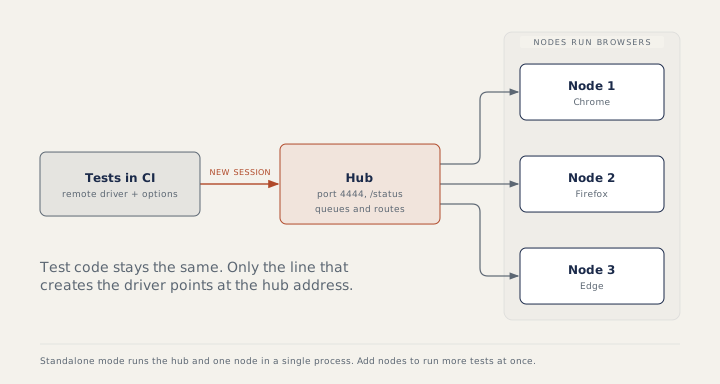
Grid 4 runs in three shapes: standalone (hub and node in one process, good for a trial), hub and node, or fully distributed, where the hub's jobs (router, distributor, session map, session queue, event bus) run as separate processes. The quickest start is the server jar or the official Docker image:
java -jar selenium-server-<version>.jar standalone
docker run -d -p 4444:4444 --shm-size="2g" selenium/standalone-chrome
Docker packages a program with everything it needs into a container, a small isolated environment, so you can start Grid with one command. Grid listens on port 4444 (a port is a number that tells the machine which program should receive the request). http://localhost:4444/status reports whether it is ready, which CI scripts (CI, continuous integration, means a server runs your tests automatically after each code change) check before starting tests. The larger shared memory (--shm-size) stops Chrome from crashing inside the container.
Connecting from Java, step by step
ChromeOptions options = new ChromeOptions();
WebDriver driver = new RemoteWebDriver(URI.create("http://grid-host:4444").toURL(), options);
- Create the browser options as for a local run.
- Create a
RemoteWebDriverwith the Grid address and the options. - Run the test as usual. Nothing else changes, because
RemoteWebDriverimplementsWebDriver.
A driver factory (a small class that creates the driver) reads the Grid address from configuration and returns a local or a remote driver. The old /wd/hub path still works but is not needed in Grid 4. File uploads on Grid need setFileDetector(new LocalFileDetector()), and downloads need options.setEnableDownloads(true) plus the HasDownloads methods.
Headless browsers
Headless means the browser runs without a visible window. Add --headless=new to ChromeOptions; it is the normal mode on CI servers and in containers. Three things change. The default window is small, so responsive pages may switch to a mobile layout and hide menus; always set --window-size=1920,1080. Screenshots still work. Tools that press keys at operating system level, such as the Robot class, do not. When a test fails only headless, compare the window size and the screenshots first.
What Selenium cannot do
It drives web pages only: native mobile apps need Appium. It cannot solve CAPTCHAs or read OTPs (one-time passwords sent by SMS) from a phone; ask for a test-environment switch, a test key or a test inbox API instead of trying to beat a security control. It has no built-in visual comparison, test runner or reports. Chromium-only extras such as DevTools access (HasDevTools) exist, but keep them out of the core of a cross-browser suite.
Selenium, Playwright or Cypress?
Selenium implements the W3C WebDriver standard, with official bindings in many languages, drivers from the browser makers, and Grid and cloud support; waits and reporting are your job. Playwright waits automatically before actions and has network mocking (faking server answers), tracing (a recording of each test step) and parallel workers built in, with Java, Python, JavaScript and .NET clients. Cypress runs inside the browser with a strong interactive runner, supports JavaScript and TypeScript only, and makes multi-tab flows harder.
How to answer in an interview
For Grid, explain hub and node in two sentences, show the RemoteWebDriver line, and say when you would use it: a slow suite, parallel CI runs or many browsers. For tool choice, decide by the team's language, the browsers you must cover and the existing suite. A working suite usually gains more from better waits and structure than from a rewrite.
Common mistakes
- Forgetting the window size in headless runs.
- Starting tests before
/statussays the Grid is ready. - Uploading on Grid without the file detector.
- Promising that a tool switch will fix flaky tests by itself.
Recap
Grid runs browsers remotely: the hub routes sessions, nodes run browsers, port 4444. Connect with RemoteWebDriver and the same options. Run headless with a fixed window size, know Selenium's limits, and choose tools by team needs.
11 questions0/11 solved
| Status | Question | Difficulty | Asked in |
|---|---|---|---|
| Not started | Selenium Grid: hub and node, and when you need it | Medium | Asked in: Accenture, Capgemini, Infosys |
| Not started | Connect a Java test to Selenium Grid | Easy-Medium | Asked in: Accenture, Capgemini, Infosys |
| Pro+ | Starting Selenium Grid | Medium | Asked in: Accenture, Capgemini, Infosys |
| Pro+ | Running the browser headless: what changes? | Medium | |
| Pro+ | Which argument starts Chrome headless? | Easy | |
| Pro+ | Can you automate CAPTCHA, OTP or barcodes? | Medium | Asked in: Accenture, Infosys |
| Pro+ | Selenium versus Playwright and Cypress | Medium | Asked in: Capgemini, Infosys |
| Pro+ | Mobile automation basics: how Appium works | Medium | Asked in: Accenture, TCS, Wipro |
| Pro+ | Grid address and readiness check | Easy-Medium | Asked in: Accenture, Capgemini, Infosys |
| Pro+ | Visual comparison tests and their traps | Medium-Hard | |
| Pro+ | Chrome DevTools features from Selenium 4 Java | Medium-Hard | Asked in: Accenture, Infosys, TCS +1 |
The first 2 questions of each topic are free. Pro+ opens every question.