
Automation tool (Selenium) · Python
Locators and XPath
Finding elements by id, name, CSS and XPath, and writing robust locators.
Learn: Locators and XPath in Selenium Python8 minute read
A locator is the rule Selenium uses to find an element, such as "the input whose name is email". Most failed live tasks fail on locators, so interviewers test them hard: can you find elements several ways, write XPath for awkward cases, and explain why one locator is better than another? A good locator is unique (exactly one match), stable (survives small page changes) and easy to read.
A quick reminder of what you are searching. A web page is written in HTML, and each part of it is an element. This one input element has a tag name (input) and three attributes (a name and a value, written as name="value"):
<input id="email" name="email" class="field">
Here id is email, name is email and class is field. Locators work by tag name, attribute or text. DevTools, the tools built into Chrome (open them with F12), let you look at these elements on any page.
By constants and locator tuples
from selenium.webdriver.common.by import By

driver.find_element(By.ID, "email")
driver.find_element(By.NAME, "email")
driver.find_element(By.CLASS_NAME, "btn")          # one class only
driver.find_element(By.TAG_NAME, "h1")
driver.find_element(By.LINK_TEXT, "Log out")
driver.find_element(By.PARTIAL_LINK_TEXT, "Inbox")
driver.find_element(By.CSS_SELECTOR, "form#login input[name='email']")
driver.find_element(By.XPATH, "//button[normalize-space()='Save']")
The old find_element_by_id style was removed in Selenium 4.3; it now fails with AttributeError. In page objects, keep each locator as a tuple (a fixed pair of values) and unpack it with *:
EMAIL = (By.ID, "email")
driver.find_element(*EMAIL).send_keys("a@b.com")
Waits take the tuple as it is: EC.visibility_of_element_located(EMAIL). (This is an explicit wait, which pauses until the element is visible; see Waits.)
Which strategy to choose
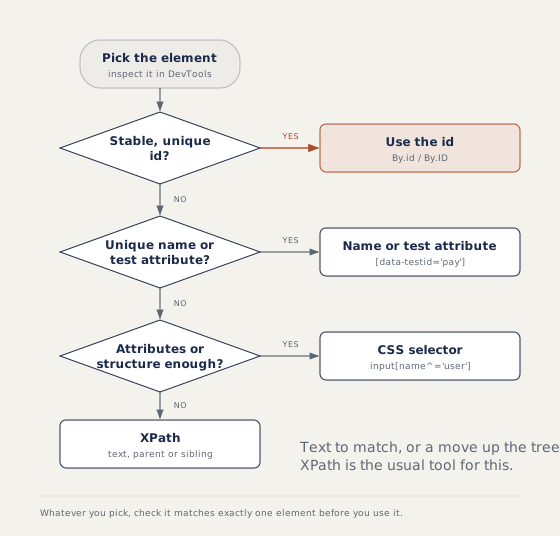
A test attribute such as data-testid="pay" exists only for tests, so it rarely changes. By.CLASS_NAME takes one class; use CSS .btn.primary for two.
find_element versus find_elements
find_element returns the first match or raises NoSuchElementException. find_elements returns a list, empty when nothing matches. So an absence check is assert not driver.find_elements(By.ID, "error"). When two elements share an id, find_element quietly returns the first one in the page, which may be a hidden copy; count the matches to find out.
CSS selectors
#emailis an id,.errora class,input#emailadds the tag.[name='email']matches an attribute;^=starts with,$=ends with,*=contains.form > inputis a direct child;form inputis any element inside.
CSS is short and readable but cannot match visible text, and it has no step that goes from a child up to its parent (XPath has .. and parent::).
XPath
XPath is a language for walking the page's element tree. Avoid absolute paths such as /html/body/div[2]/form/input[1]; one layout change breaks them. Write relative paths starting with //. Inside a path, / is a direct child and // any depth.
//button[text()='Sign in']
//a[contains(text(),'Inbox')]
//input[starts-with(@id,'user_')]
//span[normalize-space()='Total']
Mix quote types so you need no escapes: By.XPATH, "//button[text()='Save']". To build one from data, use an f-string: f"//td[text()='{name}']".
Axes
An axis moves from one element to a related one, such as its parent, an ancestor or the next sibling:
//label[text()='Email']/following-sibling::input[1]
//td[text()='Ravi']/ancestor::tr
//tr[td[text()='Ravi']]//button[text()='Edit']
Start from something stable, then walk to the target. "The Edit button in Ravi's row" comes up often in live rounds. A sibling is an element with the same parent, and a tr is one table row.
Dynamic ids and repeated matches
For ids like btn_48213, match the fixed part (starts-with, ^=), use the visible text, or anchor on a stable neighbour. (//button[@class='add'])[2] is the second match in the page, while //button[@class='add'][2] means the second matching button inside its own parent and often matches nothing. In Python, driver.find_elements(*ADD)[1] is the plain way to take the second.
Relative locators and shadow DOM
from selenium.webdriver.support.relative_locator import locate_with

password = driver.find_element(locate_with(By.TAG_NAME, "input").below({By.ID: "email"}))
inner = driver.find_element(By.ID, "host").shadow_root.find_element(By.CSS_SELECTOR, "#inner")
Relative locators find an element by where it is on the screen, compared with an anchor element you already know, so window size can change the result. A shadow root is a hidden sub-document inside a web component. shadow_root is a property; search inside it with CSS, because Chrome rejects XPath there.
How to answer in an interview
Give your order of preference and the reason. While coding, say you would test the locator in Chrome DevTools first: $x("//button[text()='Save']") runs an XPath and $$("button.save") a CSS selector in the console. For CSS versus XPath, say CSS is shorter, XPath can match text and move up the tree.
Common mistakes
- Using the absolute "full XPath" copied from DevTools.
- Dropping the inner brackets in a wait (see Waits). Expected conditions take one tuple:
EC.visibility_of_element_located((By.ID, "x")). - Choosing an index when a label or text would identify the element.
Recap
Prefer id, then name or a test attribute, then CSS, then XPath. Keep locators as tuples, use find_elements for absence checks, and reach for contains, starts-with and axes when attributes change.
23 questions0/23 solved
| Status | Question | Difficulty | Asked in |
|---|---|---|---|
| Not started | Locate a field by its id | Easy | Asked in: Accenture, Capgemini, TCS +1 |
| Not started | One element versus many: what happens when nothing matches? | Easy | Asked in: Accenture, Capgemini, Infosys +2 |
| Not started | Find every matching element and count them | Easy | Asked in: Accenture, Capgemini, Infosys +2 |
| Not started | Locate an element by its name attribute | Easy | Asked in: Accenture, Capgemini, TCS +1 |
| Not started | Locate an element by one class name | Easy | Asked in: Accenture, Capgemini, TCS +1 |
| Not started | Locate a heading by its tag name | Easy | Asked in: Accenture, Capgemini, TCS +1 |
| Not started | Match a link by its exact text | Easy | Asked in: Accenture, Capgemini, TCS +1 |
| Not started | Match a link by part of its text | Easy | Asked in: Accenture, Capgemini, Infosys +2 |
| Not started | Find elements with basic CSS selectors | Easy | Asked in: Accenture, Capgemini, Infosys +1 |
| Not started | Match attributes with CSS selectors | Easy-Medium | Asked in: Accenture, Capgemini, Infosys +2 |
| Not started | Find buttons with basic XPath | Easy | Asked in: Accenture, Capgemini, Infosys +2 |
| Not started | Write dynamic XPath with contains() and starts-with() | Easy-Medium | Asked in: Accenture, Capgemini, Infosys +2 |
| Not started | Move from a child to its parent with XPath | Medium | Asked in: Accenture, Infosys |
| Not started | Two elements share one id | Easy-Medium | Asked in: Accenture, Capgemini, Wipro |
| Pro+ | Absolute and relative XPath: single and double slash | Easy | Asked in: Accenture, Capgemini, Infosys +2 |
| Pro+ | Find the input next to a label with an XPath axis | Medium | Asked in: Accenture, Infosys |
| Pro+ | XPath versus CSS selector: which do you prefer and why? | Medium | Asked in: Accenture, Capgemini, Infosys +1 |
| Pro+ | The Selenium 4 way to find an element in Python | Easy | Asked in: Accenture, Capgemini, TCS +1 |
| Pro+ | Elements whose attributes change on every load | Medium | Asked in: Capgemini, Infosys, TCS +1 |
| Pro+ | Two buttons match. How do you pick the second one? | Medium | Asked in: Accenture, Capgemini, Wipro |
| Pro+ | Relative locators in Selenium 4 Python | Medium | Asked in: Accenture, Infosys, Wipro |
| Pro+ | Find an element inside a shadow DOM (Python) | Medium-Hard | Asked in: Happiest Minds |
| Pro+ | Test an XPath or CSS selector in the browser before coding | Easy | Asked in: Infosys |
The first 2 questions of each topic are free. Pro+ opens every question.