
Automation tool (Selenium) · Java
Alerts, frames and windows
Switching to alerts, frames, tabs and windows and back.
Learn: Alerts, frames and windows in Selenium Java8 minute read
Selenium works in one context at a time. A context is the place commands go to: one window or tab, one frame inside it, or an open alert. If the element you want is in a different context, Selenium cannot see it, even when it is clearly on screen. Many "element not found" failures are really "wrong context" failures, so interviewers check that you can switch in and, just as important, back out.
JavaScript alerts
An alert is a small box drawn by the browser, not by the page: a simple alert with OK, a confirm box with OK and Cancel, or a prompt that asks for text. Locators cannot reach it. Wait for it, then switch to it:
Alert alert = new WebDriverWait(driver, Duration.ofSeconds(5))
        .until(ExpectedConditions.alertIsPresent());
String message = alert.getText();
alert.accept();          // OK
// alert.dismiss();      // Cancel on a confirm box
// alert.sendKeys("Asha"); alert.accept();   // a prompt
Switching when no alert is open throws NoAlertPresentException. Running any other command while an alert is open throws UnhandledAlertException, and Chrome's default behaviour ("dismiss and notify") closes the alert. A modal (a pop-up window drawn inside the page) built from HTML is not an alert: it is part of the page, so find it with normal locators and wait for it to be visible.
Frames
An iframe is a web page inside another web page. It has its own document, so elements inside it are invisible to the driver until you switch in:
driver.switchTo().frame("paymentFrame");                 // name or id
driver.switchTo().frame(0);                              // index
driver.switchTo().frame(driver.findElement(By.cssSelector("iframe.editor")));

driver.switchTo().parentFrame();     // one level up
driver.switchTo().defaultContent();  // back to the main page
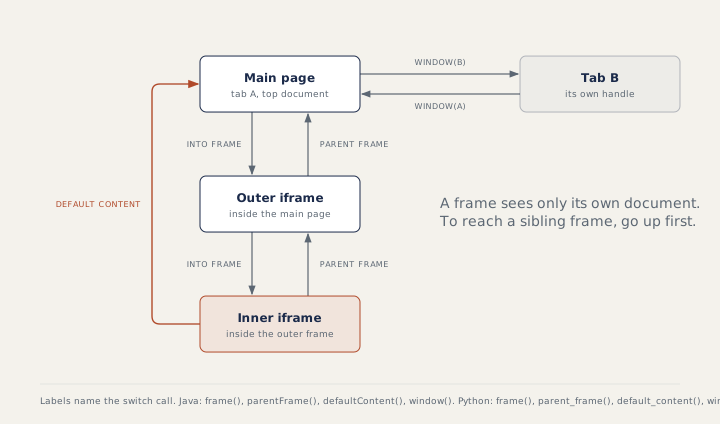
Nested frames are entered one level at a time. To reach a sibling frame, go up first. For a frame that loads late, ExpectedConditions.frameToBeAvailableAndSwitchToIt(...) waits and switches in one step. A wrong frame name throws NoSuchFrameException.
Windows and tabs
Every window or tab has a handle, a string id Selenium uses to tell them apart. getWindowHandle() returns the current one; getWindowHandles() returns a Set<String> of all of them. Clicking a link that opens a new tab does not move the driver there. The pattern:
String main = driver.getWindowHandle();
driver.findElement(By.linkText("Terms")).click();
new WebDriverWait(driver, Duration.ofSeconds(5))
        .until(ExpectedConditions.numberOfWindowsToBe(2));
for (String handle : driver.getWindowHandles()) {
    if (!handle.equals(main)) {
        driver.switchTo().window(handle);
    }
}
Assert.assertEquals(driver.getTitle(), "Terms of use");
driver.close();                    // closes this tab only
driver.switchTo().window(main);    // you must switch back yourself
With several windows open, switch to each and pick the one with the right title or URL. driver.switchTo().newWindow(WindowType.TAB) (Selenium 4) opens a new tab and switches to it in one call.
Pop-ups Selenium cannot see
For a file upload, never open the dialog; send the file path to the <input type="file">. For a basic authentication box (a login box the browser itself shows before the page loads), put the credentials in the URL (https://user:pass@host/) or, on Chromium browsers (Chrome and Edge), use ((HasAuthentication) driver).register(...). Notification and location prompts are turned off through browser options. Tools that press keys at operating system level, such as the Robot class, need a visible desktop and break in headless runs and on CI (continuous integration: a server runs your tests automatically after each code change).
How to answer in an interview
Name the context, the call to enter it and the call to leave it. For windows, describe the five steps: save the main handle, click, wait for two windows, switch to the other handle, then close and switch back. Mention that the driver never switches by itself.
Common mistakes
- Forgetting
defaultContent()after frame work, then failing to find a main-page element. - Trying to jump from one frame to its sibling directly.
- Expecting the driver to follow a new tab after a click.
- Calling a command after
close()without switching, which throwsNoSuchWindowException. - Treating an HTML modal as an alert.
Recap
Alerts: wait, switch, read, accept or dismiss. Frames: enter one level at a time, leave with parentFrame() or defaultContent(). Windows: save the main handle, switch by handle, and switch back after close().
17 questions0/17 solved
| Status | Question | Difficulty | Asked in |
|---|---|---|---|
| Not started | Get back to the main page after an iframe | Easy | Asked in: Accenture, Capgemini, Cognizant +3 |
| Not started | Window handles after clicking a link that opens a new tab (Java) | Medium | Asked in: Accenture, Capgemini, Cognizant +3 |
| Not started | Accept a simple alert and read its text | Easy-Medium | Asked in: Capgemini, Infosys, TCS +1 |
| Not started | Switch into a frame by its id | Medium | Asked in: Accenture, Capgemini, Cognizant +3 |
| Not started | Handle a confirm box: OK or Cancel | Easy-Medium | Asked in: Capgemini, Infosys, TCS +1 |
| Not started | Type into a prompt alert | Medium | Asked in: Capgemini, Infosys, TCS +1 |
| Not started | Handle two alerts in a row | Medium | Asked in: TCS |
| Not started | Switch into a frame by its name | Medium | Asked in: Accenture, Capgemini, Cognizant +3 |
| Not started | Read text from nested frames | Medium-Hard | Asked in: Accenture, Capgemini, Cognizant +3 |
| Not started | Return from a frame to the main page | Medium | Asked in: Accenture, Capgemini, Cognizant +3 |
| Not started | Read the window handle, window count and title | Easy-Medium | Asked in: Accenture, Capgemini, Cognizant +3 |
| Not started | Open a new tab and return to the original window | Medium | Asked in: Accenture, Capgemini, Cognizant +3 |
| Pro+ | A command runs while an alert is open (Java) | Medium-Hard | Asked in: TCS |
| Pro+ | Move from one frame to a sibling frame | Medium | Asked in: Accenture, Capgemini, Cognizant +3 |
| Pro+ | Handle multiple windows and tabs in Java | Medium | Asked in: Accenture, Capgemini, Cognizant +3 |
| Pro+ | OS dialogs and browser login pop-ups | Medium-Hard | Asked in: Accenture, Infosys, TCS +1 |
| Pro+ | Random ad, location or notification pop-ups | Medium | Asked in: Accenture, Capgemini, Infosys |
The first 2 questions of each topic are free. Pro+ opens every question.