
Automation tool (Selenium) · Python
Alerts, frames and windows
Switching to alerts, frames, tabs and windows and back.
Learn: Alerts, frames and windows in Selenium Python8 minute read
Selenium works in one context at a time. A context is the place your commands go: one window or tab, one frame inside it, or an open alert. When a locator that looks right finds nothing, the cause is often the context, not the locator. Interviewers check that you can switch in and, just as important, back out.
JavaScript alerts
An alert is a box drawn by the browser, not by the page: a simple alert with OK, a confirm with OK and Cancel, or a prompt that asks for text. Locators cannot reach it. In Python, driver.switch_to.alert is a property that returns an Alert object:
from selenium.webdriver.support.ui import WebDriverWait
from selenium.webdriver.support import expected_conditions as EC

alert = WebDriverWait(driver, 5).until(EC.alert_is_present())
message = alert.text
alert.accept()            # OK
# alert.dismiss()         # Cancel on a confirm
# alert.send_keys("Asha"); alert.accept()    # a prompt
Reading switch_to.alert with no alert open raises NoAlertPresentException. Running another command while an alert is open raises UnexpectedAlertPresentException (Java calls it UnhandledAlertException), and with Chrome's default "dismiss and notify" behaviour the alert is closed. An HTML modal (a pop-up window drawn inside the page) is not an alert: it lives in the page, so wait for it with EC.visibility_of_element_located and use normal locators.
Frames
An iframe is a web page inside another web page, with its own document. Elements inside it stay invisible to the driver until you switch in:
driver.switch_to.frame("paymentFrame")      # name or id
driver.switch_to.frame(0)                   # index
driver.switch_to.frame(driver.find_element(By.CSS_SELECTOR, "iframe.editor"))

driver.switch_to.parent_frame()             # one level up
driver.switch_to.default_content()          # the top document
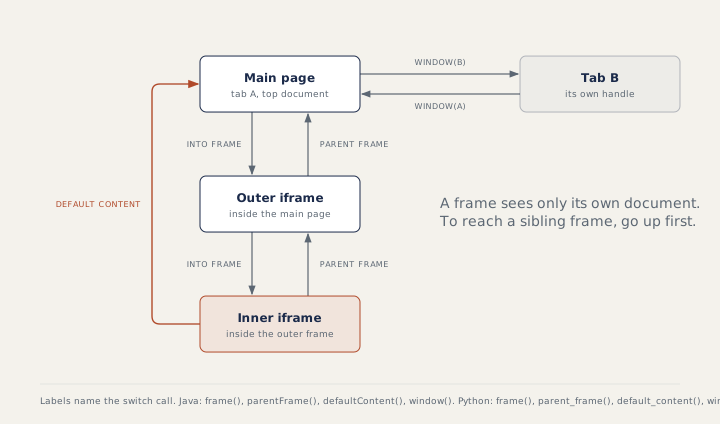
Nested frames are entered one level at a time. To reach a sibling frame, go up first. EC.frame_to_be_available_and_switch_to_it(locator) waits for a late frame and switches into it. A wrong frame name raises NoSuchFrameException.
Windows and tabs
Every window or tab has a handle, a string id. driver.current_window_handle is the current one and driver.window_handles is a list of all of them. A click that opens a new tab leaves the driver on the old one:
main = driver.current_window_handle
driver.find_element(By.LINK_TEXT, "Terms").click()
WebDriverWait(driver, 5).until(EC.number_of_windows_to_be(2))
new_tab = next(h for h in driver.window_handles if h != main)
driver.switch_to.window(new_tab)
assert driver.title == "Terms of use"
driver.close()                      # closes this tab only
driver.switch_to.window(main)       # switch back yourself
With many windows, switch to each and choose by driver.title or driver.current_url. driver.switch_to.new_window("tab") (or "window") opens one and switches to it in one call.
Pop-ups Selenium cannot see
For a file upload, never open the dialog; send_keys the absolute path to the <input type="file">. For basic authentication (a login box the browser itself shows before the page loads), put the credentials in the URL, https://user:pass@host/. Notification and location prompts are turned off with browser options, such as the --disable-notifications Chrome argument. Tools that act at operating system level need a visible desktop and break on CI (continuous integration: a server runs your tests automatically after each code change).
How to answer in an interview
For each context, name how you enter and how you leave. For windows, list the steps: save the main handle, click, wait for two windows, switch to the other handle, close it, switch back. In a longer live task (wait, nested frame, alert, assert), read your script line by line and ask "where am I now?"; it catches a missing switch quickly.
Common mistakes
- Forgetting
default_content()and then failing to find main-page elements. - Calling
driver.switch_to.alert()with brackets; it is a property. - Assuming
window_handlesis ordered by opening time; pick by handle, title or URL. - Running a command after
close()without switching, which raisesNoSuchWindowException.
Recap
Alerts: wait, switch, read, accept or dismiss. Frames: in one level at a time, out with parent_frame() or default_content(). Windows: keep the main handle, switch by handle, and switch back after closing a tab. Put driver.quit() in a finally block or fixture so the browser closes even when an assert fails.
19 questions0/19 solved
| Status | Question | Difficulty | Asked in |
|---|---|---|---|
| Not started | Get back to the main page after an iframe | Easy | Asked in: Accenture, Capgemini, Cognizant +3 |
| Not started | Window handles after a link opens a new tab (Python) | Medium | Asked in: Accenture, Capgemini, Cognizant +3 |
| Not started | Accept a simple alert and read its text | Easy-Medium | Asked in: Capgemini, Infosys, TCS +1 |
| Not started | Switch into a frame by its id | Medium | Asked in: Accenture, Capgemini, Cognizant +3 |
| Not started | Handle a confirm box: OK or Cancel | Easy-Medium | Asked in: Capgemini, Infosys, TCS +1 |
| Not started | Type into a prompt alert | Medium | Asked in: Capgemini, Infosys, TCS +1 |
| Not started | Handle two alerts in a row | Medium | Asked in: TCS |
| Not started | Read a modal without treating it as an alert | Medium | Asked in: Accenture, Capgemini, Infosys +2 |
| Not started | Switch into a frame by its name | Medium | Asked in: Accenture, Capgemini, Cognizant +3 |
| Not started | Read text from nested frames | Medium-Hard | Asked in: Accenture, Capgemini, Cognizant +3 |
| Not started | Return from a frame to the main page | Medium | Asked in: Accenture, Capgemini, Cognizant +3 |
| Not started | Read the window handle, window count and title | Easy-Medium | Asked in: Accenture, Capgemini, Cognizant +3 |
| Not started | Open a new tab and return to the original window | Medium | Asked in: Accenture, Capgemini, Cognizant +3 |
| Not started | Combine a wait, a frame and an alert in one script | Medium-Hard | Asked in: Accenture, Capgemini, Infosys +2 |
| Pro+ | A command runs while an alert is open (Python) | Medium-Hard | Asked in: TCS |
| Pro+ | Move from one frame to a sibling frame | Medium | Asked in: Accenture, Capgemini, Cognizant +3 |
| Pro+ | Handle multiple windows and tabs in Python | Medium | Asked in: Accenture, Capgemini, Cognizant +3 |
| Pro+ | OS dialogs and browser login pop-ups | Medium-Hard | Asked in: Accenture, Infosys, TCS +1 |
| Pro+ | Random ad, location or notification pop-ups | Medium | Asked in: Accenture, Capgemini, Infosys |
The first 2 questions of each topic are free. Pro+ opens every question.