
Automation tool (Selenium) · Python
Waits
Implicit, explicit and fluent waits, and fixing timing problems.
Learn: Waits in Selenium Python: implicit and explicit waits done right8 minute read
A wait tells Selenium to hold on until something is true, such as "the results table is visible". Pages load data after the main page, run animations and redraw parts of the screen. Selenium does not wait for any of that unless you ask. A test that acts too early fails only sometimes, which is called a flaky test, so waits come up in nearly every automation interview.
Why time.sleep is the wrong tool
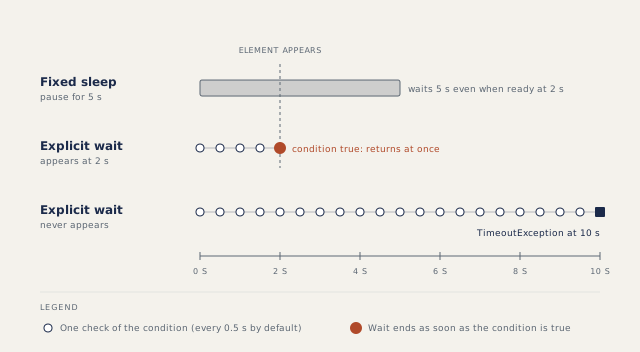
time.sleep(5) always costs five seconds, even when the page was ready after two, and it is still too short when the server is slow. A wait for a condition checks again and again, returns the moment the condition is met, and fails only after a timeout (the longest time you allow it to wait).
Implicit wait
driver.implicitly_wait(5)
A driver-wide setting: every find_element retries for up to five seconds until the element exists. The default is 0, and driver.timeouts.implicit_wait reads the current value. It only waits for presence in the DOM (the page's element tree). It cannot wait for visibility, clickability or disappearance, and it makes find_elements wait the full time before returning an empty list.
Explicit wait
from selenium.webdriver.support.ui import WebDriverWait
from selenium.webdriver.support import expected_conditions as EC

wait = WebDriverWait(driver, 10)
save = wait.until(EC.element_to_be_clickable((By.ID, "save")))
save.click()
Note the double brackets: the condition takes the locator as one tuple. until returns whatever the condition returned, here the element. By default WebDriverWait checks every 0.5 seconds and ignores NoSuchElementException between checks. When time runs out it raises TimeoutException from selenium.common.exceptions, which is not Python's built-in TimeoutError.
Common conditions in expected_conditions:
visibility_of_element_locatedandinvisibility_of_element_located, for messages and spinners.element_to_be_clickable(visible and enabled) andpresence_of_element_located(in the DOM, maybe hidden).text_to_be_present_in_element,number_of_windows_to_be,alert_is_present,staleness_of(waits until an old element reference is no longer valid; see Selenium exceptions and debugging).
wait.until_not(...) waits for a condition to become false.
Fluent-style waits and custom conditions
Java has a FluentWait class; Python does not. You get the same control from WebDriverWait's arguments and by passing your own function:
from selenium.common.exceptions import StaleElementReferenceException

wait = WebDriverWait(driver, 30, poll_frequency=0.2,
                     ignored_exceptions=[StaleElementReferenceException])
wait.until(lambda d: len(d.find_elements(By.CSS_SELECTOR, "#results tr")) >= 50,
           "the table never reached 50 rows")
The lambda is a short function written inline. It receives the driver. A falsy result (False, None, an empty list) means "keep waiting"; a truthy result (any other value) ends the wait and is returned. poll_frequency is how often to check, in seconds. Extra ignored exceptions are added to NoSuchElementException, not used instead of it. The message makes a timeout explain itself in the report.
Do not mix implicit and explicit waits
The Selenium documentation warns that mixing them makes wait times unpredictable: each lookup inside an explicit wait can also wait for the implicit timeout. Waiting for a spinner to disappear shows it best, because, once the spinner is removed from the page, the check that should confirm "gone" first sits through the whole implicit wait. Keep the implicit wait at 0.
AJAX and the other timeouts
AJAX means the page loads data in the background after it opens. driver.get() returns after the page's load event, so later data is not covered. Wait for what a user sees: the spinner gone, the element visible, the text present. A new session also has a page load timeout of 300 seconds and a script timeout of 30 seconds, changed with set_page_load_timeout and set_script_timeout.
How to answer in an interview
Define implicit and explicit waits in one line each, explain how Python gets fluent behaviour, then state your rule: "Implicit wait at 0, explicit waits inside page object methods (a page object is a class that holds the locators and actions of one page), no sleeps." Add a debugging line: when a wait times out, compare the condition with the failure screenshot.
Common mistakes
EC.element_to_be_clickable(By.ID, "save")with single brackets, which raisesTypeError.- Catching
TimeoutErrorinstead of Selenium'sTimeoutException. - Waiting for presence when the step needs visibility.
- Covering a flaky test with
time.sleep.
Recap
Wait for states, not for time. implicitly_wait covers presence only. WebDriverWait with expected_conditions or a lambda covers everything else, with poll_frequency and ignored_exceptions for fine control.
14 questions0/14 solved
| Status | Question | Difficulty | Asked in |
|---|---|---|---|
| Not started | Which wait applies to every element lookup? | Easy | Asked in: Accenture, BrowserStack, Capgemini +4 |
| Not started | Why avoid fixed sleeps and mixing implicit with explicit waits? | Medium | Asked in: Accenture |
| Not started | Wait until an element is visible | Medium | Asked in: Accenture, BrowserStack, Capgemini +4 |
| Not started | Set an implicit wait and read it back | Easy-Medium | Asked in: Accenture, BrowserStack, Capgemini +4 |
| Not started | Wait until a button is clickable | Medium | Asked in: Accenture, BrowserStack, Capgemini +4 |
| Not started | Wait until an element disappears | Medium | Asked in: Infosys |
| Not started | Wait for two elements that appear at different times | Medium | Asked in: Infosys |
| Not started | Diagnose a wait that times out | Medium | Asked in: Accenture |
| Pro+ | Implicit, explicit and fluent-style waits in Python | Medium | Asked in: Accenture, BrowserStack, Capgemini +4 |
| Pro+ | A custom wait condition with a lambda (Python) | Medium | Asked in: Infosys, TCS, Wipro |
| Pro+ | WebDriverWait defaults in Selenium Python | Medium | Asked in: Accenture, BrowserStack, Capgemini +4 |
| Pro+ | How do you handle AJAX or content that loads after the page? | Medium | Asked in: Infosys |
| Pro+ | The three driver timeouts and their defaults (Python) | Medium-Hard | |
| Pro+ | Page load strategies: normal, eager and none | Medium |
The first 2 questions of each topic are free. Pro+ opens every question.