
CI/CD and tools
Jenkins
Jobs, declarative pipelines, triggers and test reports.
Learn: Jenkins for testers: declarative pipelines, triggers, parameters and reports9 minute read
Jenkins is a CI server: a program that starts jobs, such as building code and running tests, on a trigger (an event such as a code change or a set time that starts the job), and reports the results. A job is one named piece of work that Jenkins can run. It is still the CI server most often named in QA job posts, and "How do you run your tests from Jenkins?" is a standard question. Modern answers focus on a declarative pipeline (a fixed, easy-to-read format for the list of steps) written in a text file called a Jenkinsfile, stored with the code. This article explains the pieces, with a complete file that passes the Jenkins declarative linter (the checker that finds mistakes in the file's structure). You do not need to write Groovy, the language of the file, but you should be able to read it.
CI, continuous delivery and continuous deployment
In continuous integration, developers merge small changes often, and every change is built and tested automatically. With continuous delivery, every change that passes the pipeline is ready to release, but a person decides when it goes to production. With continuous deployment, passing changes go to production automatically. The further a team goes, the more it depends on fast, reliable tests.
Jobs and pipelines
Older Jenkins setups use freestyle jobs configured through forms in the web page. A Pipeline job instead reads its steps from a Jenkinsfile, so the pipeline is kept in Git, reviewed in pull requests and can be restored from history, like code. A multibranch pipeline creates a job for each branch or pull request automatically.
A complete declarative Jenkinsfile
pipeline {
    agent { label 'linux' }
    parameters {
        choice(name: 'SUITE', choices: ['smoke', 'regression'], description: 'Which TestNG suite to run')
        choice(name: 'ENV', choices: ['staging', 'test'], description: 'Target environment')
    }
    triggers {
        cron('H 1 * * *')
    }
    options {
        timeout(time: 90, unit: 'MINUTES')
        buildDiscarder(logRotator(numToKeepStr: '30'))
    }
    environment {
        APP_LOGIN = credentials('qa-test-user')
    }
    stages {
        stage('Checkout') {
            steps {
                checkout scm
            }
        }
        stage('Test') {
            steps {
                sh "mvn -B test -Dsuite=${params.SUITE} -Denv=${params.ENV}"
            }
        }
    }
    post {
        always {
            junit 'target/surefire-reports/*.xml'
            archiveArtifacts artifacts: 'target/screenshots/**', allowEmptyArchive: true
        }
        failure {
            mail to: 'qa-team@example.com',
                 subject: "Failed: ${env.JOB_NAME} #${env.BUILD_NUMBER}",
                 body: "Console: ${env.BUILD_URL}console"
        }
    }
}
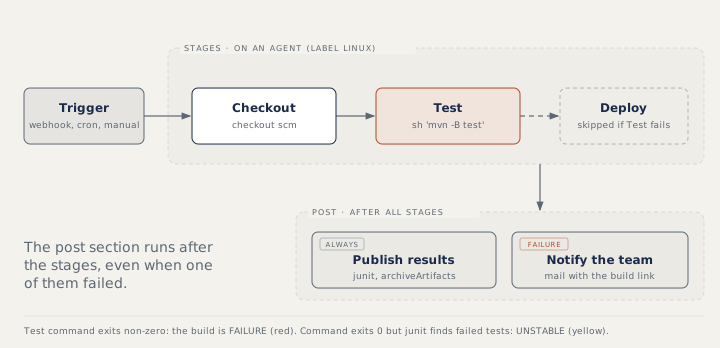
In the file, a stage is one named phase of the pipeline, such as Checkout (download the code) or Test. Reading it from the top:
pipelinewraps everything.agent, the machine that runs the work, is required at the top level:any, alabel, ornone(then each stage declares its own).stagesholdsstageblocks, and each stage's commands must sit insidesteps. A stage that runsshdirectly fails validation.parametersadds "Build with Parameters", and the values are read asparams.SUITE. Runs started by a trigger use the defaults; for achoice, that is the first entry.triggersholdscronfor schedules,pollSCMto check the repository for new commits on a schedule, orupstreamto run after another job. Webhooks from GitHub or GitLab (a message the website sends to Jenkins when something happens) start builds on each push without polling.optionsholds atimeout, which stops a hung browser run from blocking an agent, andbuildDiscarder, which deletes old build records so the disk does not fill up.environmentwithcredentials()loads a secret stored in Jenkins, so the password is not written in the file. For a username-and-password credential, Jenkins also setsAPP_LOGIN_USRandAPP_LOGIN_PSW, and masks the values in the console log (shows****instead of the real text).postholds actions that run after the stages (explained below).archiveArtifactssaves files, such as screenshots, so you can download them later.
Cron, H and quotes
Cron is a standard way to write a schedule. The five cron fields are minute, hour, day of month, month and day of week. H 1 * * * means once a day in the 1 a.m. hour; H 2 * * 1-5 means weekdays in the 2 a.m. hour. H stands for a number worked out from the job name (a hash), so each job gets its own fixed minute and hundreds of jobs scheduled "at 1" do not all start at once.
A Jenkinsfile is written in Groovy. Double-quoted strings fill in ${...} (they replace it with the variable's value), so the Test stage runs mvn -B test -Dsuite=smoke -Denv=staging. Single-quoted strings are passed as written. For secrets, prefer single quotes and let the shell read the environment variable, so Groovy does not write the secret into the command.
Results: failure, unstable and post
When an sh command exits with a non-zero code, the step fails ("script returned exit code 1"), later stages are skipped, and the build is FAILURE (red). The junit step reads JUnit XML files (a standard test result format), shows results and trends per test, and marks the build UNSTABLE (yellow) when the results contain failures. Teams that want red for broken builds and yellow for failing tests run Maven with -Dmaven.test.failure.ignore=true and let junit decide.
post runs after the stages. Its conditions are always, changed, fixed, regression, aborted, failure, success, unstable, unsuccessful and cleanup (evaluated last). Publish reports in always, because you need them most when tests fail.
How to answer in an interview
Describe the job type (a pipeline from the repository), the stages, the triggers (a webhook for pull requests, cron for the nightly run), the parameters (browser, environment, suite), how secrets arrive (credentials) and how results are published (junit, artifacts, notifications). Then mention reliability: timeouts, a clean workspace (the folder where the job works) and pinned tool versions (exact version numbers written down).
Common mistakes
- Putting
shstraight inside a stage withoutsteps. - Single quotes where a parameter value must be filled in.
- Publishing reports only on success.
- Hard-coding passwords instead of using
credentials().
Recap
A declarative pipeline has an agent, stages with steps, and optional parameters, triggers, options, environment and post sections. Cron with H spreads schedules, double quotes fill in values, a non-zero exit code means FAILURE, and failed test results through junit mean UNSTABLE. Publish results in post always.
11 questions0/11 solved
| Status | Question | Difficulty | Asked in |
|---|---|---|---|
| Not started | Continuous integration, delivery and deployment | Easy | |
| Not started | How do you run your tests from Jenkins? | Medium | Asked in: Accenture, Capgemini, Infosys +2 |
| Pro+ | Fix this declarative Jenkinsfile | Easy-Medium | Asked in: Capgemini, Infosys |
| Pro+ | Read the Jenkinsfile: when is the e-mail sent? | Easy | Asked in: Accenture, Capgemini, Infosys +2 |
| Pro+ | Read the Jenkinsfile: when does it start on its own? | Easy-Medium | Asked in: Accenture, Capgemini, Infosys +2 |
| Pro+ | Read the Jenkinsfile: which command runs? | Medium | Asked in: Accenture, Capgemini, Infosys +2 |
| Pro+ | Why is the build yellow (UNSTABLE)? | Medium | Asked in: Accenture, Capgemini, Google +5 |
| Pro+ | Read the Jenkinsfile: how do tests get the password? | Medium | |
| Pro+ | Jenkins post conditions | Medium | Asked in: Capgemini, Infosys |
| Pro+ | Webhook, pollSCM or cron? | Medium | Asked in: Accenture, Capgemini, Infosys +2 |
| Pro+ | Write a Jenkinsfile for a nightly test job | Medium-Hard | Asked in: Accenture, Capgemini, Infosys +2 |
The first 2 questions of each topic are free. Pro+ opens every question.