
Framework · Java
BDD with Cucumber or behave
Feature files, step definitions and when BDD helps.
Learn: BDD with Cucumber in Java9 minute read
BDD (behaviour-driven development) is a way of working where the team agrees on examples of how the product should behave, then turns those examples into tests that run. Cucumber is the tool most Java teams use for it. The examples are written in Gherkin, a plain-language format with Given, When and Then steps. Interviewers ask about Cucumber's parts (feature files, step definitions, glue and a runner), hooks, tags and runners, and often whether BDD is worth it, which needs an honest answer.
How the parts fit
Feature files
A feature file is a text file ending in .feature that holds scenarios, which are the examples. Each scenario is a list of steps:
@checkout
Feature: Checkout

  Background:
    Given I am logged in as a customer

  @smoke
  Scenario: Pay with a saved card
    Given my cart holds 2 items
    When I pay with my saved card
    Then I see the order confirmation

  Scenario Outline: Coupon rules
    Given my cart total is <total>
    When I apply the coupon "<code>"
    Then I see the message "<message>"

    Examples:
      | total | code   | message         |
      | 100   | SAVE10 | Coupon applied  |
      | 20    | SAVE10 | Minimum not met |
A Scenario is one example with fixed values. A Scenario Outline is a template that runs once per row of its Examples table, filling the placeholders in angle brackets. A Background holds steps that run before every scenario in the file; keep it short.
Step definitions
A step definition is a Java method that runs when a step's text matches its pattern. The package that holds them is called the glue, and you tell Cucumber where it is so it can find them.
public class CheckoutSteps {
    private final TestContext ctx;          // shared per scenario through dependency injection

    public CheckoutSteps(TestContext ctx) { this.ctx = ctx; }

    @Given("my cart holds {int} items")
    public void cartHolds(int count) { ctx.api().fillCart(count); }

    @When("I apply the coupon {string}")
    public void applyCoupon(String code) { ctx.cartPage().applyCoupon(code); }

    @Then("I see the message {string}")
    public void seeMessage(String message) {
        Assert.assertEquals(ctx.cartPage().message(), message);
    }
}
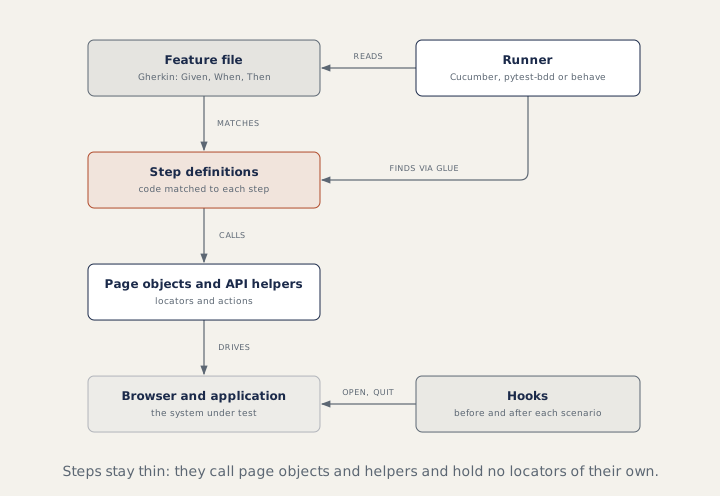
Cucumber expressions mark each value with a type in braces: {int}, {float}, {word} or {string} for quoted text. Regular expressions (patterns for matching text) also work when needed. A table under a step arrives as a DataTable parameter, and table.asMaps() gives one map per row. Step definitions should be thin: they call page objects and API helpers and hold no locators. Step classes share state through a dependency injection module such as PicoContainer (a small tool that creates the TestContext object and hands it to every step class that asks for it), once per scenario, never through static fields.
Three messages to watch for: the same expression defined twice fails as a duplicate step definition; one step text matched by two definitions is ambiguous; and a step with no definition is undefined, with a code snippet printed to start from.
Hooks and tags
@Before
public void openBrowser() { ctx.startBrowser(); }

@After
public void closeBrowser(Scenario scenario) {
    if (scenario.isFailed()) {
        byte[] png = ((TakesScreenshot) ctx.driver()).getScreenshotAs(OutputType.BYTES);
        scenario.attach(png, "image/png", scenario.getName());
    }
    ctx.driver().quit();
}
@Before runs before the first step of each scenario, so before the Background. @After runs after the last step, even when a step failed. @BeforeStep, @AfterStep, @BeforeAll and @AfterAll also exist, and a hook can be limited by a tag expression, such as @After("@ui and not @headless") (a tag expression is a rule that combines tags with and, or and not). Tags such as @smoke label features or scenarios, and tag expressions combine them: -Dcucumber.filter.tags="@smoke and not @wip", where @wip is a common tag for work in progress.
Runners
A runner is the class that starts Cucumber. For new projects, Cucumber recommends the JUnit Platform (the engine that runs JUnit 5 tests):
@Suite
@IncludeEngines("cucumber")
@SelectPackages("com.acme.features")
@ConfigurationParameter(key = GLUE_PROPERTY_NAME, value = "com.acme.steps")
public class RunCucumberTest { }
With TestNG, a class extends AbstractTestNGCucumberTests and sets @CucumberOptions(features = ..., glue = ..., tags = ..., plugin = ...). Each scenario becomes a TestNG test, and overriding scenarios() with @DataProvider(parallel = true) runs them in parallel. Cucumber now marks this TestNG module as deprecated (it still works but is being phased out), which is worth knowing when you start a new project.
How to answer in an interview
For "explain your Cucumber framework", walk the picture above: feature files, step definitions in a glue package, page objects underneath, hooks for the browser, a runner with tags. Then say honestly who reads the feature files. BDD pays off when product owners (the people who decide what the product should do) read or write them; when only testers do, Gherkin is an extra layer to maintain.
Common mistakes
- Writing click-by-click scenarios instead of declarative ones (they say what the user wants, not each click) like "When I pay with my saved card".
- Putting locators in step definitions.
- Sharing the driver between step classes through static fields.
- A long Background that hides what each scenario needs.
Recap
Gherkin feature files describe behaviour, step definitions match each step with a Cucumber expression, and page objects (see Page objects and design patterns) do the work. Hooks open and close the browser around each scenario, tags pick what runs, and a JUnit Platform or TestNG runner starts it all.
9 questions0/9 solved
| Status | Question | Difficulty | Asked in |
|---|---|---|---|
| Not started | Scenario versus Scenario Outline | Easy | Asked in: Accenture, Capgemini, Infosys +1 |
| Not started | BDD with Cucumber: feature files, step definitions, glue and runner | Medium | Asked in: Accenture, Capgemini, Coforge +3 |
| Pro+ | Scenario Outline, Examples and Background | Medium | Asked in: Accenture, Capgemini, Infosys +1 |
| Pro+ | Cucumber hooks and tags (Java) | Medium | Asked in: Accenture, Capgemini, Infosys +1 |
| Pro+ | Tables and parameters in Cucumber steps; duplicate steps | Medium-Hard | Asked in: Accenture, Capgemini, TCS |
| Pro+ | Run Cucumber scenarios with TestNG | Medium | Asked in: Accenture |
| Pro+ | Tag expressions | Easy-Medium | Asked in: Accenture, Capgemini, Infosys +1 |
| Pro+ | When does BDD help, and when is it overhead? | Medium | Asked in: Accenture, Capgemini, Coforge +3 |
| Pro+ | Run Cucumber scenarios in parallel with TestNG | Medium-Hard | Asked in: Accenture, Capgemini, Infosys +3 |
The first 2 questions of each topic are free. Pro+ opens every question.