
Framework · Python
BDD with Cucumber or behave
Feature files, step definitions and when BDD helps.
Learn: BDD in Python with pytest-bdd and behave9 minute read
BDD (behaviour-driven development) is a way of working where the team agrees on examples of how the product should behave, then turns those examples into tests that run. The examples are written in Gherkin, a plain-language format with Given, When and Then steps. Python has two well-known BDD tools. pytest-bdd runs each scenario as an ordinary pytest test, so fixtures, markers and plugins keep working. behave is a separate runner with its own hooks and a shared context object. Interviewers ask how the parts fit, how data reaches the steps, and whether BDD is worth it.
How the parts fit
Feature files
A feature file is a text file ending in .feature that holds scenarios, which are the examples. Each scenario is a list of steps:
@checkout
Feature: Checkout

  Background:
    Given I am logged in as a customer

  @smoke
  Scenario: Pay with a saved card
    Given my cart holds 2 items
    When I pay with my saved card
    Then I see the order confirmation

  Scenario Outline: Coupon rules
    Given my cart total is <total>
    When I apply the coupon "<code>"
    Then I see the message "<message>"

    Examples:
      | total | code   | message         |
      | 100   | SAVE10 | Coupon applied  |
      | 20    | SAVE10 | Minimum not met |
A Scenario is one fixed example. A Scenario Outline runs once per Examples row, filling the placeholders in angle brackets. A Background runs before every scenario in the file and should stay short.
pytest-bdd
A step function is a Python function that runs when a step's text matches its pattern.
from pytest_bdd import scenarios, given, when, then, parsers

scenarios("features/checkout.feature")

@given(parsers.parse("my cart holds {count:d} items"), target_fixture="cart")
def cart(api, count):
    return api.new_cart(items=count)

@when(parsers.parse('I apply the coupon "{code}"'))
def apply_coupon(cart_page, code):
    cart_page.apply_coupon(code)

@then(parsers.parse('I see the message "{message}"'))
def see_message(cart_page, message):
    assert cart_page.message() == message
scenarios(...)turns every scenario in the file into a pytest test;@scenariobinds a single one.- Step functions ask for fixtures like any test:
driver, page objects, an API client. - Parsers pull values out of the step text, for example the number 2 from "my cart holds 2 items".
parsers.parseis the readable one, with types such as:dfor whole numbers.parsers.cfparseadds repeated fields, andparsers.reuses regular expressions (patterns for matching text) with named groups. target_fixturemakes a step's return value available to later steps as a fixture. That is how steps share data without global variables.- Common steps in
conftest.pyare shared by every feature file below it.
Tags (labels such as @smoke on a scenario) become pytest markers with the @ removed, so pytest -m "smoke and not wip" selects scenarios; register the tags as markers. Set-up and teardown are normal fixtures, and screenshots on failure use the same report hook as any pytest test (see Reports, screenshots and logs). Because scenarios are pytest tests, pytest-xdist, pytest-html and Allure all work.
behave
behave expects a folder layout: feature files in features/, step modules in features/steps/, and hooks in features/environment.py.
# features/environment.py
from selenium import webdriver

def before_scenario(context, scenario):
    context.driver = webdriver.Chrome()

def after_step(context, step):
    if step.status == "failed":
        context.driver.save_screenshot(f"{step.name[:40]}.png")

def after_scenario(context, scenario):
    context.driver.quit()
Steps use from behave import given, when, then and receive context, which carries values between the steps of a scenario (a plain object where you can store things, such as context.driver). The default step matcher uses the same {name:d} style as parse. A table under a step is context.table, read row by row with row["name"], and multi-line text is context.text. Tags are chosen with behave --tags=smoke or --tags="not slow".
A team that already uses pytest usually picks pytest-bdd, because fixtures, markers, parallel runs and report plugins carry over. behave suits teams that want a BDD-first runner with a simple folder convention.
How to answer in an interview
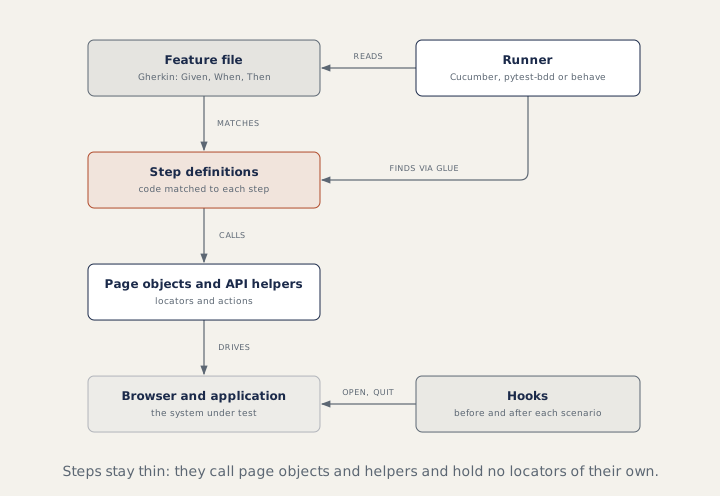
Walk the picture: feature files, step functions matched by parsers, page objects underneath, fixtures or environment.py hooks for the browser, and tags to pick what runs. Then say who reads the feature files. BDD earns its cost when business people (such as product owners, who decide what the product should do) read or write them; when only testers do, Gherkin is an extra layer to maintain.
Common mistakes
- Click-by-click scenarios instead of declarative steps (they say what the user wants, not each click) such as "When I pay with my saved card".
- Passing data between steps through globals instead of
target_fixtureorcontext. - Writing
pytest --tags, which is behave's option, not pytest's. - Near-duplicate steps with slightly different wording.
Recap
Gherkin feature files describe behaviour. In pytest-bdd, scenarios() turns them into pytest tests, parsers feed step arguments, and target_fixture shares values. In behave, environment.py holds the hooks and context carries values. Either way, steps stay thin and call page objects (see Page objects and design patterns).
9 questions0/9 solved
| Status | Question | Difficulty | Asked in |
|---|---|---|---|
| Not started | Scenario versus Scenario Outline | Easy | Asked in: Accenture, Capgemini, Infosys +1 |
| Not started | BDD in Python: feature files and step definitions with pytest-bdd | Medium | Asked in: Accenture, Capgemini, Coforge +3 |
| Pro+ | Scenario Outline, Examples and Background | Medium | Asked in: Accenture, Capgemini, Infosys +1 |
| Pro+ | Hooks and tags in Python BDD tools | Medium | Asked in: Accenture, Capgemini, Infosys +1 |
| Pro+ | Parameters, outlines and tables in Python BDD steps | Medium-Hard | Asked in: Accenture, Capgemini, Infosys +2 |
| Pro+ | Run only @smoke scenarios with pytest-bdd | Easy-Medium | Asked in: Accenture, Capgemini, Infosys +1 |
| Pro+ | Tag expressions | Easy-Medium | Asked in: Accenture, Capgemini, Infosys +1 |
| Pro+ | When does BDD help, and when is it overhead? | Medium | Asked in: Accenture, Capgemini, Coforge +3 |
| Pro+ | The layout of a behave project | Easy-Medium | Asked in: Accenture, Capgemini, Coforge +3 |
The first 2 questions of each topic are free. Pro+ opens every question.