
Framework · Python
Parallel and CI runs
Running tests in parallel safely and from a CI server.
Learn: Parallel and CI runs for a Selenium pytest suite9 minute read
A parallel run executes several tests at the same time, each in its own browser. It turns a slow nightly suite into one that can run on every pull request (a proposed code change that teammates review before it is merged, that is, added to the main code). CI (continuous integration) is the server, such as Jenkins or GitHub Actions, that runs those tests on every change. In Python the parallel tool is the pytest-xdist plugin. Interviewers want to know how it works and what breaks when tests run side by side.
pytest-xdist basics
pytest itself runs tests one at a time. pytest-xdist is a separate plugin (pip install pytest-xdist) that starts worker processes and shares the tests out between them:
pytest -n 4            # four workers
pytest -n auto         # one worker per physical CPU core
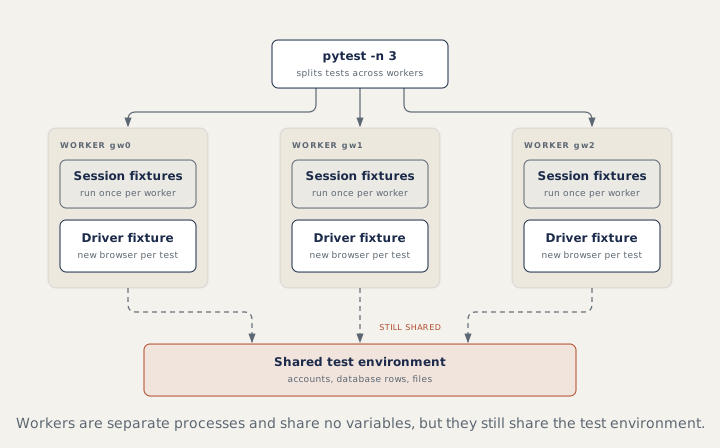
A process is a separate running program with its own memory, and a worker is one such process that runs part of your tests (a CPU core is one processing unit of the computer). So module-level variables are never shared between workers, which removes one kind of bug. Things outside Python, such as accounts, database rows and files, are still shared.
How tests are shared out
--dist load(the default): any free worker takes the next test.--dist loadscope: tests of one module, or one class, stay on one worker.--dist loadfile: tests of one file stay together.--dist loadgroup: tests marked with the same@pytest.mark.xdist_group(name="...")stay together.--dist worksteal: an even split at first, then idle workers take tests from busy ones.
Grouping helps with expensive module fixtures, but tests should still pass in any order. If tests only pass when grouped, they depend on each other.
Fixtures and workers
A scope="session" fixture runs once per worker, not once per run. With -n 4, a session fixture that seeds data can run four times. For work that must happen exactly once, use a file lock (a file that lets only one worker continue at a time) inside the fixture (the xdist documentation shows the pattern), or do it in a CI step before pytest starts. The worker_id fixture tells a test which worker it is on ("gw0", "gw1", or "master" without xdist), which helps give each worker its own account:
@pytest.fixture(scope="session")
def account(worker_id, config):
    return config["accounts"][worker_id]
A parallel-safe driver fixture
@pytest.fixture
def driver(request):
    d = create_driver(request.config)       # local or Grid, from options
    yield d
    d.quit()
Function scope gives every test a fresh browser. Never keep the driver in a module-level global. Screenshots and downloads go to tmp_path (a folder pytest makes for each test) or to names that include the test name, so workers never overwrite each other's files.
Capacity, the command line and CI
Each worker runs a browser. Pick a worker count the machine can handle, measure the run time, and move to Selenium Grid (a setup that runs browsers on several machines) when one machine is not enough; the driver fixture then returns webdriver.Remote. Declare options in the root conftest.py with pytest_addoption, and CI runs one line:
pytest -m smoke --browser=chrome --env=qa --headless -n 4 --junitxml=results.xml
A typical pipeline (the list of steps the CI server runs) checks out the code (downloads it) and installs pinned versions (exact library versions) from requirements.txt. It provides browsers, headless (no visible window) on the machine or in a Grid container (a small packaged environment, such as Docker), then runs pytest with the job's options: smoke on pull requests, the full regression nightly. It always publishes the JUnit XML and the HTML or Allure report, even when tests fail. A failed smoke run (a short run of the most important tests) blocks the merge, and passwords come from the CI secret store.
How to answer in an interview
For "how do you run tests in parallel?", give three parts: the tool ("pytest-xdist with -n 4; workers are separate processes"), the driver ("a function-scoped fixture, so each test has its own browser"), and the shared things ("unique data per test, worker-aware accounts, and session fixtures that run once per worker").
Common mistakes
- Expecting a session fixture to run once for the whole run under xdist.
- Sharing one test account across workers, so they log each other out.
- Fixed file names for screenshots and downloads.
- Using
-n autoon a small CI machine that cannot run that many browsers.
Recap
pytest-xdist runs tests in separate worker processes with -n. Workers share no Python variables, but they share accounts, data and files, so each test needs unique data. Session fixtures run once per worker, the driver fixture stays function-scoped, and CI runs one pytest command and always publishes the results.
8 questions0/8 solved
| Status | Question | Difficulty | Asked in |
|---|---|---|---|
| Not started | Run pytest tests in parallel | Easy-Medium | Asked in: Accenture, Capgemini, Infosys +3 |
| Not started | Run Selenium tests in parallel safely (pytest) | Medium-Hard | Asked in: Accenture, Capgemini, Infosys +3 |
| Pro+ | Session fixtures with pytest-xdist | Medium-Hard | Asked in: Accenture, Capgemini, Infosys +3 |
| Pro+ | Run the suite from the command line or CI with a chosen browser and environment (pytest) | Medium | Asked in: Accenture |
| Pro+ | Keep some tests on the same xdist worker | Medium-Hard | Asked in: Accenture, Capgemini, Infosys +3 |
| Pro+ | Which xdist worker is running this test? | Medium | Asked in: Accenture, Capgemini, Infosys +3 |
| Pro+ | Running UI tests in a CI pipeline | Medium | Asked in: Accenture, Capgemini, Infosys +3 |
| Pro+ | Tests pass alone but fail in parallel | Medium | Asked in: Accenture, Capgemini, Infosys +3 |
The first 2 questions of each topic are free. Pro+ opens every question.