
Your language · Java
Collections: lists, sets and maps
The built-in collections, when to use each, and how they behave.
Learn: Java collections: lists, sets and maps9 minute read
A collection is an object that holds a group of other objects. Java's collection framework is one of the most asked topics, because every automation project uses it: Selenium (a tool that controls a browser from code) returns page elements as a List and window handles (the IDs of open browser windows) as a Set, and headers (extra information sent with a web request) and test data usually live in a Map. Interviewers want to see that you can pick the right type and explain how a HashMap finds a key.
Step 1: the family
Each box below is an interface, which is a type that lists methods without fixing how they work. The classes under each name are the real implementations you create.
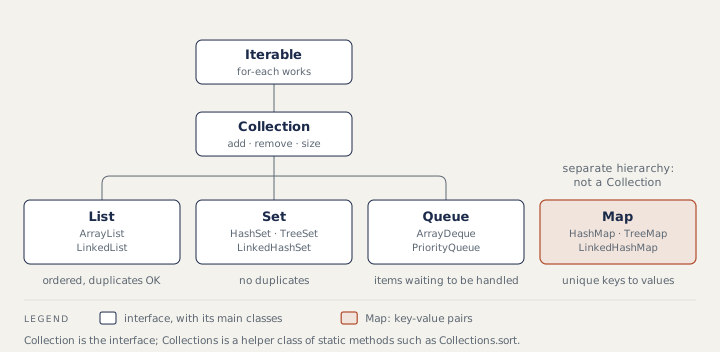
A List keeps insertion order and allows duplicates. A Set never holds the same value twice. A Map stores pairs: each unique key points to one value. Declare variables by the interface, as in List<String> names = new ArrayList<>();, so you can swap the class later. Do not mix up Collection, the interface, with Collections, a helper class with static methods such as Collections.sort.
Step 2: lists
ArrayList is a resizable array. Reading get(i) is fast and adding at the end is fast, but inserting in the middle is slow because later elements must shift. Its first add makes room for 10 elements, and it grows by about half when full. LinkedList is a chain of nodes: fast at both ends, slow to reach position i, and heavier in memory. Use ArrayList by default and ArrayDeque for a queue.
Two factory methods return lists you cannot fully change. List.of(...) rejects any change and any null (null means "no value"). Arrays.asList(...) has a fixed size: set works, but add and remove throw UnsupportedOperationException. Copy them into new ArrayList<>(...) when you need to change them.
Step 3: sets, maps and hashing
HashSet and HashMap find items in constant time on average (written O(1): the time does not grow as the collection gets bigger), but their order is not useful. Later you will also see O(n), where the time grows in step with the size, and O(log n), which grows very slowly. The Linked versions keep insertion order. TreeSet and TreeMap keep items sorted.
A HashMap keeps an array of buckets (slots that each hold a few entries), 16 at first. put calls the key's hashCode() (a method that turns the key into a number) to choose a bucket, then equals() to look for the same key there. If the key exists, its value is replaced and put returns the old value. When more than 75% of the capacity is used, the map doubles its size. That is why a class used as a key must override equals() and hashCode() together. A HashSet is built on a HashMap: each element is stored as a key.
import java.util.*;
import java.util.stream.*;

public class Main {
    public static void main(String[] args) {
        List<String> links = List.of("Home", "Login", "Home", "Cart", "Login");
        System.out.println(new HashSet<>(links).size());           // duplicates gone
        System.out.println(new LinkedHashSet<>(links));            // page order kept
        System.out.println(new TreeSet<>(links));                  // sorted

        Map<String, Integer> counts = new HashMap<>();
        for (String link : links) {
            counts.merge(link, 1, Integer::sum);
        }
        System.out.println(new TreeMap<>(counts));                 // sorted by key

        Map<String, Integer> stock = new LinkedHashMap<>();
        stock.put("pen", 3);
        Integer old = stock.put("pen", 5);                         // replace value
        System.out.println(old + " -> " + stock.get("pen") + ", missing: " + stock.get("ink"));

        Map<String, Integer> byValue = counts.entrySet().stream()
            .sorted(Map.Entry.<String, Integer>comparingByValue().reversed()
                    .thenComparing(Map.Entry.comparingByKey()))
            .collect(Collectors.toMap(Map.Entry::getKey, Map.Entry::getValue,
                    (x, y) -> x, LinkedHashMap::new));
        System.out.println(byValue);
    }
}
3
[Home, Login, Cart]
[Cart, Home, Login]
{Cart=1, Home=2, Login=2}
3 -> 5, missing: null
{Home=2, Login=2, Cart=1}
HashMap allows one null key and null values. Hashtable and ConcurrentHashMap reject both. For a map shared between threads (parts of a program that run at the same time), use ConcurrentHashMap.
Step 4: sorting and safe removal
A class that implements Comparable has one natural order through compareTo, as String and Integer do. A Comparator is a separate object for any other order: products.sort(Comparator.comparing(Product::price).reversed()). The :: part is a method reference, a short way to say "use this method"; see Lambdas and streams. To check that a table column is sorted, copy the values, sort the copy and compare the two lists.
Never remove items inside a for-each loop. The loop uses a hidden iterator (an object that walks through the list one item at a time), and it usually throws ConcurrentModificationException, and in some positions it silently skips an item. Use removeIf or an explicit Iterator.
import java.util.*;

public class Main {
    public static void main(String[] args) {
        List<Integer> ids = new ArrayList<>(List.of(1, 2, 3, 4, 5, 6));
        try {
            for (Integer id : ids) {
                if (id == 2) ids.remove(id);
            }
        } catch (ConcurrentModificationException e) {
            System.out.println("for-each removal failed");
        }
        ids.removeIf(id -> id % 2 == 0);
        System.out.println(ids);

        Iterator<Integer> it = ids.iterator();
        while (it.hasNext()) {
            if (it.next() > 3) it.remove();
        }
        System.out.println(ids);
    }
}
for-each removal failed
[1, 3, 5]
[1, 3]
How to answer in an interview
Pick the family by two questions: does order matter, and are duplicates allowed? Then pick the class by speed and ordering, and give a test example: "Window handles come back as a Set because each handle is unique. To keep link texts unique and in page order, I use a LinkedHashSet." For "how does a HashMap work?", walk through put: hash, bucket, equals, replace or add, resize.
Common mistakes
- Saying
Mapis aCollection. It is not; it is its own family. - Overriding
equals()withouthashCode(), so "equal" keys end up twice in a set. - Calling
addon a list fromList.oforArrays.asList. - Removing items inside a for-each loop.
- Choosing
LinkedListfor speed without a reason.
Recap
List: ordered, duplicates allowed. Set: unique values. Map: unique keys to values, in its own hierarchy. ArrayList, HashSet and HashMap are the usual defaults; the Linked versions keep insertion order (the order you added items) and the Tree versions sort. A HashMap uses hashCode() to find the bucket and equals() to find the key.
13 questions0/13 solved
| Status | Question | Difficulty | Asked in |
|---|---|---|---|
| Not started | Pick the right collection for a test task | Easy | Asked in: Accenture, Capgemini, Cognizant +3 |
| Not started | List vs Set vs Map, with a use for each in tests | Easy | Asked in: Accenture, Capgemini, Infosys +2 |
| Pro+ | Collection framework hierarchy; Collection vs Collections | Easy-Medium | Asked in: Accenture, Capgemini, TCS +1 |
| Pro+ | ArrayList vs LinkedList | Medium | Asked in: Accenture, Capgemini, Infosys +2 |
| Pro+ | Array vs ArrayList, and default capacities | Medium | Asked in: Capgemini, TCS, Wipro |
| Pro+ | How does a HashMap work internally? | Medium-Hard | Asked in: Accenture, Capgemini, Cognizant +1 |
| Pro+ | HashMap vs Hashtable vs ConcurrentHashMap | Medium | Asked in: Accenture, Capgemini, TCS |
| Pro+ | HashSet vs LinkedHashSet vs TreeSet; hash map vs hash set | Medium | Asked in: Cognizant, Infosys, TCS |
| Pro+ | Comparable vs Comparator; sorting a map by value | Medium | Asked in: Accenture, Infosys |
| Pro+ | Valid ways to loop over a map | Easy-Medium | Asked in: Accenture, Infosys, TCS |
| Pro+ | Removing items while looping over a list | Medium | Asked in: Accenture, Infosys, TCS |
| Pro+ | List.of and Arrays.asList are not ordinary lists | Medium | Asked in: Capgemini, Wipro |
| Pro+ | equals() without hashCode() in a HashSet | Medium-Hard | Asked in: Cognitree, Deloitte |
The first 2 questions of each topic are free. Pro+ opens every question.