
SQL
GROUP BY and HAVING
Grouping rows and filtering groups.
Learn: GROUP BY and HAVING: totals per group and filtering groups7 minute read
An aggregate on its own gives one number for the whole table. GROUP BY splits the rows into groups that share a value and returns one result row per group: employees per department, total sales per sales rep (salesperson), orders per status. Interviewers ask GROUP BY in nearly every SQL round, usually followed by "what is the difference between WHERE and HAVING?". The examples use the company data.
One row per group
The database sorts the rows into groups by the GROUP BY column, then calculates each aggregate (COUNT, MAX and so on) inside each group:
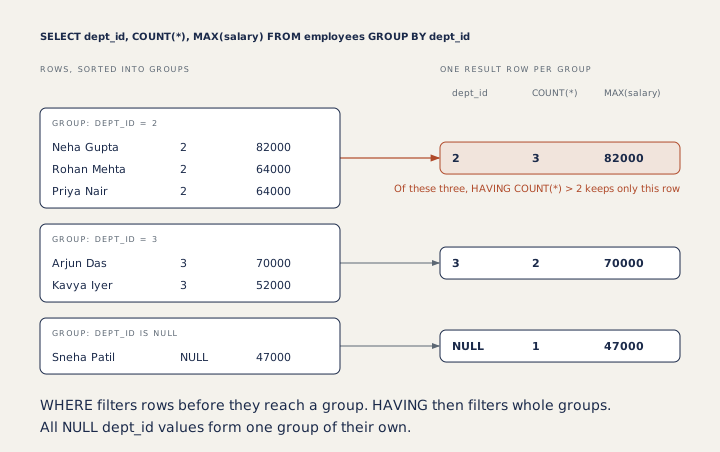
Here is the same query on the whole table:
SELECT dept_id, COUNT(*) AS employees, MAX(salary) AS top_salary
FROM employees
GROUP BY dept_id;dept_id | employees | top_salary NULL | 1 | 47000 1 | 3 | 150000 2 | 3 | 82000 3 | 2 | 70000 4 | 1 | 58000
Look at the first row. All employees with no department form a single group whose dept_id is NULL. If you do not want that group, filter it out first with WHERE dept_id IS NOT NULL.
The rule for selected columns
Each result row stands for a whole group, so every selected column must have one value per group. A column is allowed if it is in GROUP BY or inside an aggregate. SELECT dept_id, name, COUNT(*) ... GROUP BY dept_id breaks the rule: department 1 has three employees, so which name should its row show? PostgreSQL rejects the query, and so does MySQL with its default settings. SQLite runs it and picks a name from one of the rows, which hides the mistake.
You can group by several columns. The groups are then the different combinations:
SELECT employee_id, status, COUNT(*) AS orders
FROM orders
WHERE employee_id IN (6, 7)
GROUP BY employee_id, status;employee_id | status | orders 6 | CANCELLED | 1 6 | DELIVERED | 1 6 | PENDING | 2 7 | DELIVERED | 2 7 | SHIPPED | 2
HAVING filters groups
WHERE filters rows before they are grouped. It cannot use an aggregate, because the groups do not exist yet. HAVING filters the groups afterwards, so it can:
SELECT dept_id, COUNT(*) AS employees
FROM employees
GROUP BY dept_id
HAVING COUNT(*) > 2;dept_id | employees 1 | 3 2 | 3
A query can use both. Here WHERE drops cancelled orders, GROUP BY adds up each rep's remaining orders, and HAVING keeps reps with at least 15,000:
SELECT employee_id, SUM(amount) AS total
FROM orders
WHERE status <> 'CANCELLED'
GROUP BY employee_id
HAVING SUM(amount) >= 15000;employee_id | total 6 | 15000 7 | 47500
Rep 6 has exactly 15,000 once the cancelled order is gone, so the exact limit decides the answer: >= keeps rep 6 and > would not. Read "more than", "at least" and "up to" carefully.
Sorting groups
ORDER BY runs after grouping, so it can sort by an aggregate or by its alias. Add a second column so ties come out in a fixed order:
SELECT status, COUNT(*) AS orders
FROM orders
GROUP BY status
ORDER BY orders DESC, status;status | orders DELIVERED | 5 PENDING | 2 SHIPPED | 2 CANCELLED | 1
Averages per group
SELECT dept_id, COUNT(*) AS employees, ROUND(AVG(salary)) AS avg_salary
FROM employees
WHERE dept_id IS NOT NULL
GROUP BY dept_id;dept_id | employees | avg_salary 1 | 3 | 113333 2 | 3 | 70000 3 | 2 | 61000 4 | 1 | 58000
Department 2 averages exactly 70,000, so a question that says "more than 70,000" must leave it out.
Where testers use this
Finding duplicates is the classic use: GROUP BY email HAVING COUNT(*) > 1 lists every email used more than once. Grouping also checks reports (totals per status or per day against the screen) and data loads (the number of rows in the database against the number of rows in the file you loaded).
How to answer in an interview
For "WHERE versus HAVING", give the one-line answer first: WHERE filters rows before grouping, HAVING filters groups after the aggregates are computed. Then add the reason: WHERE runs before GROUP BY, so it cannot see COUNT or SUM. Finish with a query that uses both, like the rep totals above.
Common mistakes
- Putting an aggregate in WHERE, such as
WHERE COUNT(*) > 2. - Selecting a column that is neither grouped nor aggregated.
- Forgetting that NULLs form their own group.
- Using
>where the question says "at least".
Recap
GROUP BY gives one row per group. Every selected column is grouped or aggregated. WHERE filters rows before grouping and HAVING filters groups after it. ORDER BY can sort by an aggregate.
8 questions0/8 solved
| Status | Question | Difficulty | Asked in |
|---|---|---|---|
| Not started | Number of employees in each department | Easy-Medium | Asked in: TCS |
| Not started | Departments with more than two employees (HAVING) | Easy-Medium | Asked in: TCS |
| Pro+ | WHERE versus HAVING | Easy-Medium | Asked in: TCS |
| Pro+ | Orders per status, most common first | Easy-Medium | |
| Pro+ | Count per department, including no department | Easy-Medium | |
| Pro+ | WHERE and HAVING in one query | Medium | Asked in: TCS |
| Pro+ | Departments with a high average salary | Medium | Asked in: IBM |
| Pro+ | Which columns may appear next to GROUP BY? | Medium |
The first 2 questions of each topic are free. Pro+ opens every question.