
SQL
Joins
Inner, left and self joins, and finding rows with no match.
Learn: Joins: inner, left, right, full and self joins8 minute read
Data about one thing is spread over several tables. An order holds an employee id, and the employee row holds a department id. A join puts related rows from two tables side by side in one result. Joins come up in almost every SQL interview for testers, usually as "explain the join types, then write one". The examples use the company data, where one employee has no department, one department (Support) has no employees, and one order points to an employee who does not exist.
Inner join and left join
A join needs a condition that says which rows belong together, written after ON. Here an employee belongs with the department whose id equals the employee's dept_id. The two most used joins differ only in what happens to rows that have no partner:
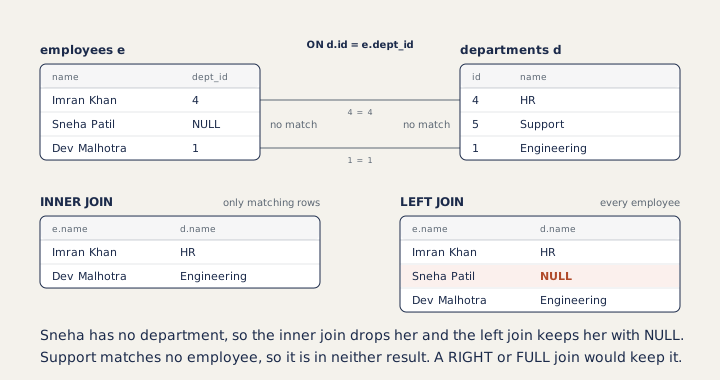
An inner join (JOIN or INNER JOIN) keeps only rows that match:
SELECT e.name, d.name AS department
FROM employees e
JOIN departments d ON d.id = e.dept_id
WHERE d.id IN (2, 3);name | department Neha Gupta | QA Rohan Mehta | QA Priya Nair | QA Arjun Das | Sales Kavya Iyer | Sales
The short names e and d are table aliases. Use them whenever two tables are involved, and put them in front of every column (e.name, d.name), because both tables here have a name column and SQL cannot tell which one you mean.
LEFT JOIN keeps every row of the left table, which is the one written before the word JOIN. Where there is no match, the right table's columns are NULL. Sneha Patil has no department, so an inner join drops her and a left join keeps her:
SELECT e.name, d.name AS department
FROM employees e
LEFT JOIN departments d ON d.id = e.dept_id
WHERE e.id >= 8;name | department Imran Khan | HR Sneha Patil | NULL Dev Malhotra | Engineering
Finding rows with no match
Testers use the left join most to find what is missing: departments without employees, orders whose employee does not exist. Left join, then keep the rows where the right side is NULL:
SELECT d.name
FROM departments d
LEFT JOIN employees e ON e.dept_id = d.id
WHERE e.id IS NULL;name Support
Counting per group needs the same care. COUNT(*) counts the joined row even when its employee part is NULL, which would give Support a count of 1. Count a column from the right table instead:
SELECT d.name, COUNT(e.id) AS employees
FROM departments d
LEFT JOIN employees e ON e.dept_id = d.id
GROUP BY d.id, d.name;name | employees Engineering | 3 QA | 3 Sales | 2 HR | 1 Support | 0
Self join
A table can be joined to itself. Each employee row holds a manager_id, which is the id of another employee. Give the table two aliases and join them. A left join keeps the top manager, who has no manager:
SELECT e.name AS employee, m.name AS manager
FROM employees e
LEFT JOIN employees m ON m.id = e.manager_id
WHERE e.id <= 4;employee | manager Asha Rao | NULL Vikram Shah | Asha Rao Neha Gupta | Asha Rao Rohan Mehta | Neha Gupta
Right and full outer joins
A RIGHT JOIN B keeps every row of B. It gives the same rows as B LEFT JOIN A, so most people write only left joins. FULL OUTER JOIN keeps unmatched rows from both sides. PostgreSQL supports both, and SQLite added them in version 3.39. MySQL has right joins but no full outer join; you build one from a left join and a right join combined with UNION, which stacks two results into one (see UNION and set operations). This is a common follow-up question.
Three tables
Joins chain. Here each order gets its rep's name and the rep's department, and a subquery (a query inside another query) keeps orders above the average amount. Order 107, whose rep does not exist, drops out at the first inner join:
SELECT o.id, o.amount, e.name AS rep, d.name AS department
FROM orders o
JOIN employees e ON e.id = o.employee_id
JOIN departments d ON d.id = e.dept_id
WHERE o.amount > (SELECT AVG(amount) FROM orders);id | amount | rep | department 101 | 12000 | Arjun Das | Sales 104 | 15000 | Kavya Iyer | Sales 106 | 9500 | Kavya Iyer | Sales 109 | 15000 | Kavya Iyer | Sales
How to answer in an interview
Start with one line per type. Inner: only rows that match in both tables. Left: all rows of the left table, with NULLs where the right has no match. Right: the mirror image. Full outer: all rows of both. Self join: a table joined to itself, such as employee and manager. Then write a left join that finds rows with no match, because that is how testers use joins every day.
Common mistakes
- A WHERE condition on the right table undoes a left join. In
departments LEFT JOIN employees ... WHERE e.salary > 60000, Support has a NULL salary, the condition is not true, and Support disappears. Put the condition in ON instead:ON e.dept_id = d.id AND e.salary > 60000. - A missing or wrong join condition multiplies rows. With no condition every row pairs with every row: 10 employees and 5 departments give 50 rows. When a result looks too big, compare row counts before and after the join.
- Using
COUNT(*)after a left join, which counts unmatched rows as 1. - Leaving out table aliases, so
nameis ambiguous.
Recap
Inner joins keep matches only, and left joins keep every row of the left table. A left join with IS NULL on the right side finds missing data. Conditions on the right table of a left join go in ON, not WHERE.
9 questions0/9 solved
| Status | Question | Difficulty | Asked in |
|---|---|---|---|
| Not started | Employee name with department name (INNER JOIN) | Easy-Medium | Asked in: Accenture, Capgemini, GreyOrange +2 |
| Not started | Every employee, with a department if there is one (LEFT JOIN) | Easy-Medium | Asked in: Accenture, Capgemini, GreyOrange +2 |
| Pro+ | Every department with its number of employees, including 0 | Medium | Asked in: Accenture, Capgemini, GreyOrange +2 |
| Pro+ | Employee and manager names (self join) | Medium | Asked in: Accenture, Capgemini, GreyOrange +2 |
| Pro+ | Departments with no employees (LEFT JOIN and IS NULL) | Medium | |
| Pro+ | Average salary per city across two tables | Medium | Asked in: Coupa |
| Pro+ | Join three tables and filter with a subquery | Medium-Hard | Asked in: GreyOrange |
| Pro+ | Inner, left, right and full joins | Medium | Asked in: Accenture, Capgemini, GreyOrange +2 |
| Pro+ | A WHERE condition that undoes a LEFT JOIN | Medium-Hard |
The first 2 questions of each topic are free. Pro+ opens every question.