
CI/CD and tools
Branching and merging
Branches, merge and rebase, conflicts and pull requests.
Learn: Branching and merging: merge, rebase, conflicts and pull requests8 minute read
A branch is a separate line of work, so several people can change the same code without getting in each other's way. Interviewers ask about merge versus rebase, how you resolve a conflict and how your team uses pull requests, because these decide whether a test suite stays green (all tests pass) while many people change it. A commit is one saved snapshot of the project; the Git basics topic explains commits. This article explains each with the exact commands.
Branches are cheap pointers
A branch is a movable name that points at a commit (a pointer is just a label that refers to something else). Creating one costs almost nothing, because no files are copied:
git switch -c feature/login-tests     # create and switch (same as git checkout -b)
git branch                            # list local branches
git switch main                       # move back
New commits move the current branch forward. HEAD means "where you are now": the commit you are currently on.
Merging
git merge feature brings the commits of feature into the current branch. If the current branch has no new commits since feature started, Git just moves the pointer forward (a fast-forward) and creates no merge commit. If both branches have new commits, Git combines them in a merge commit, a commit with two parents (one from each branch). History is not rewritten, so merging is safe on shared branches. git merge --no-ff forces a merge commit even when a fast-forward is possible, which some teams like for keeping features visible.
Rebasing
git rebase main, run on your feature branch, takes your commits and replays them on top of the latest main: Git sets them aside, moves your branch to the newest main commit, and applies your changes again one by one. The history becomes a straight line, as if you had started your work today.
git switch feature/login-tests
git fetch
git rebase origin/main
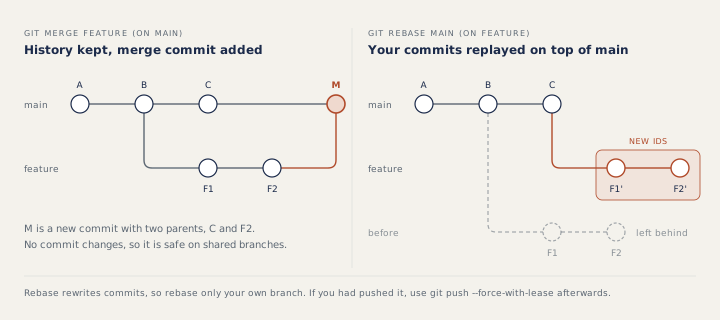
Rebased commits are new commits with new ids, and the old ones are left behind. That gives the golden rule: do not rebase commits that others already have, because their copies would no longer match yours. Rebase your own feature branch to update it, and merge into shared branches. After rebasing a branch you had already pushed, a normal push is rejected; use git push --force-with-lease, which refuses to overwrite the remote if someone else pushed in the meantime. Interactive rebase (git rebase -i) can also squash (join several commits into one) and reword (change the message of) local commits before a pull request.
Conflicts
A conflict happens when both sides changed the same lines, or one changed a file the other deleted. Git stops and marks the file:
<<<<<<< HEAD
timeout=30
=======
timeout=60
>>>>>>> feature
The lines between <<<<<<< HEAD and ======= are from your current branch; the lines between ======= and >>>>>>> feature are from the branch being merged. Here, one side wants a timeout of 30 and the other 60, and you must choose. To resolve it:
git statuslists the conflicted files.- Understand both changes: read the other commit or pull request, and ask its author if unsure. Often the right result keeps both.
- Edit the file to the final content and delete every marker line.
git addthe file, thengit commit(orgit merge --continue). During a rebase:git add, thengit rebase --continue.- Compile and run the affected tests before pushing.
If it goes wrong, git merge --abort or git rebase --abort returns to the state before you started.
Cherry-pick and deleting branches
git cherry-pick COMMIT_ID copies the change of one commit onto the current branch as a new commit, the usual way to bring one fix to a release branch. Run that branch's tests afterwards. git branch -d feature/old refuses to delete a branch whose commits are not merged; -D forces it.
Pull requests and team workflows
A pull request (merge request in GitLab) asks to merge a branch, and it is where review and CI (a server that runs the build and tests automatically) happen. A short-lived branch carries one change; CI runs the build and the relevant tests; reviewers check readability, waits, locators (how a test finds an element on a page), assertions and that no secrets (passwords, tokens) were committed; and main is protected, which usually means nobody can push to it directly and merging needs approvals and green checks. Teams use feature branches, trunk-based development (very short branches merged at least daily, with feature flags, which are on/off switches in the code, hiding unfinished work), or release branches as in GitFlow (a method with separate long-lived branches for development and releases).
How to answer in an interview
For merge versus rebase, say what each does to history in one sentence each, then the rule: "I rebase my own branch to update it, and merge into shared branches." For conflicts, walk through the five steps above and stress that you run the tests before pushing.
Common mistakes
- Rebasing or force-pushing a shared branch such as main.
- Keeping your side of a conflict without reading the other change.
- Leaving a marker line in a config file.
- Using plain
--forcewhere--force-with-leasewould protect a teammate's commits.
Recap
Branches are cheap pointers. Merge joins histories and is safe on shared branches; rebase replays your commits with new ids, so keep it to your own work. Resolve conflicts by understanding both sides, then stage, commit and test. Pull requests with protected branches and green CI keep the shared code, and the test suite, healthy.
11 questions0/11 solved
| Status | Question | Difficulty | Asked in |
|---|---|---|---|
| Not started | Create a branch and switch to it | Easy | Asked in: Accenture, Capgemini, TCS +1 |
| Not started | git merge versus git rebase | Medium | Asked in: Accenture, Capgemini, TCS |
| Pro+ | When is a merge a fast-forward? | Medium | Asked in: Accenture, Capgemini, TCS |
| Pro+ | What does rebase do to your commit ids? | Medium | Asked in: Accenture, Capgemini, TCS |
| Pro+ | Read Git conflict markers | Easy-Medium | Asked in: Accenture |
| Pro+ | Walk me through resolving a merge conflict | Medium | Asked in: Accenture |
| Pro+ | You fixed the conflicted file. What next? | Easy-Medium | Asked in: Accenture |
| Pro+ | Copy one fix to a release branch | Medium | |
| Pro+ | git branch -d refuses to delete a branch | Easy-Medium | |
| Pro+ | Pull requests and branching strategies | Medium | Asked in: Accenture, Capgemini, Google +4 |
| Pro+ | Push a rebased feature branch safely | Medium-Hard | Asked in: Accenture, Capgemini, TCS |
The first 2 questions of each topic are free. Pro+ opens every question.