
CI/CD and tools
Git basics
Repositories, commits, pushing, pulling and checking history.
Learn: Git basics for testers: commits, pushing, pulling and undoing safely8 minute read
Git is a version-control tool: it records snapshots of your files so you can see what changed, share work and go back when something breaks. Test code lives in Git like product code, and almost every QA interview asks which Git commands you use. Follow-up questions ("Why does git diff show nothing?", "How do you undo a pushed commit?") test whether you understand the model behind the commands, so this article explains that model first.
Git and GitHub
Git runs on your machine. A repository (repo) is a project folder together with its full history. Each saved snapshot is a commit, with an id, an author, a message and a link to its parent commit (the commit that came just before it). GitHub (like GitLab, Bitbucket or Azure Repos) is a service that hosts Git repositories and adds pull requests (a request to add your changes to the main code, which others review first), code review, issues and CI (a server that runs your tests automatically; see the Jenkins topic). Git works offline; only clone, fetch, pull and push talk to a remote, the shared copy usually called origin.
Three places your changes live
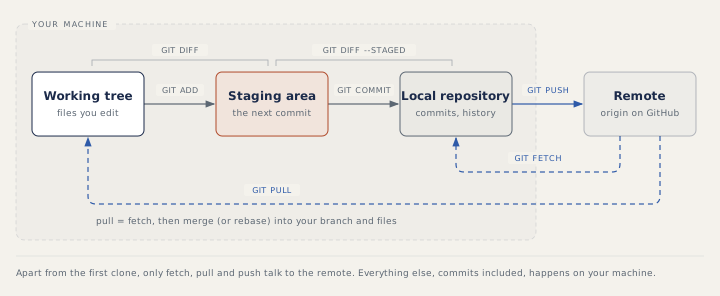
Your changes move through three places on your machine. The working tree is the files you edit. The staging area (also called the index) holds the changes you have chosen for the next commit. The repository holds the commits.
git status                    # what is changed, staged, untracked
git add LoginTest.java        # stage one file
git commit -m "Fix login test wait"
git diff                      # working tree versus staging area
git diff --staged             # staging area versus last commit
git log --oneline             # short history
Tracked files are the ones Git already knows; untracked files are new files Git has not seen yet. The staging area lets you commit part of your work, for example the test fix without your local config tweak. A common surprise: after git add, git diff shows nothing, because the change is now staged; git diff --staged shows it.
Working with a remote
git clone https://github.com/acme/shop-tests.git   # once
git fetch                     # download new commits, change nothing of yours
git pull                      # fetch, then integrate into your branch
git push                      # send your commits
A branch is a separate line of commits, so you can work without touching the main code (the next topic explains branches). git fetch updates remote-tracking branches, which are your local copies of the remote's branches, such as origin/main, and is always safe. git pull fetches and then merges, which joins the other commits into your branch (or rebases, which replays your commits on top of them, if configured or with --rebase). When both your branch and the remote have new commits, recent Git versions stop and ask how to combine them, unless pull.rebase or pull.ff is set.
If git push is rejected because the remote has commits you do not have, bring them in first with git pull, fix any conflicts (places where both sides changed the same lines, so Git cannot choose), run the tests and push again.
Setting work aside
git stash             # park uncommitted changes to tracked files
git stash -u          # also include untracked (new) files
git stash list
git stash pop         # bring the latest stash back
Typical use: you are halfway through a change and must fix something urgent on another branch.
Undoing things
The right command depends on whether the commit is shared:
- To discard local edits to a file, use
git restore file; to unstage it,git restore --staged file. - To fix your last local commit (its message or a forgotten file), use
git commit --amend, only if it is not pushed. - To undo local commits, use
git reset.--soft HEAD~1removes the last commit (HEADis the commit you are on, and~1means one step back) and keeps its changes staged;--mixed, the default, keeps them in your files unstaged;--hardthrows them away. - To undo a commit that is already shared, use
git revert COMMIT_ID. It adds a new commit that reverses the change, so nobody's history is rewritten (old commits stay as they are).
Ignoring files and keeping secrets out
.gitignore is a text file that lists files Git should not track: build output (target/, __pycache__/), reports, IDE folders, .venv/, local config. It only affects untracked files; a file already committed stays tracked until you run git rm --cached file and commit. A secret that was ever committed stays in history, so change the password or token too. The safer pattern is a committed config.example file with placeholders, and real secrets read from environment variables.
How to answer in an interview
For "Which Git commands do you use?", describe a normal day in order: git switch main and git pull, git switch -c feature/checkout-tests, edit and run the tests, git add and git commit in small steps, git push -u origin feature/checkout-tests, then a pull request. For undo questions, ask yourself first (and say it out loud): "Has anyone else got this commit?" If yes, revert; if no, reset or amend.
Common mistakes
- Fixing a rejected push with
git push --forceon a shared branch, which throws away other people's work. - Using
git reset --hardwithout checking what it will discard. - Adding a committed file to
.gitignoreand expecting Git to forget it. - Commit messages like "fix"; "Wait for cart badge before asserting count" says what and why.
Recap
Changes move from the working tree to the staging area with git add, into the repository with git commit, and to the remote with git push. fetch only downloads; pull also integrates. Revert shared commits, reset only local ones, and keep secrets out of the repository. The next topic covers branches, merging, rebasing and conflicts.
10 questions0/10 solved
| Status | Question | Difficulty | Asked in |
|---|---|---|---|
| Not started | Git versus GitHub | Easy | Asked in: Capgemini |
| Not started | Git commands you use every day | Easy | Asked in: Accenture, Capgemini, TCS +1 |
| Pro+ | What does git commit record? | Easy | Asked in: Accenture, Capgemini, TCS +1 |
| Pro+ | Set aside unfinished work with git stash | Easy-Medium | Asked in: Accenture, Capgemini, TCS +1 |
| Pro+ | git fetch versus git pull | Easy-Medium | Asked in: Accenture, Capgemini, TCS |
| Pro+ | git push is rejected. What do you do? | Easy-Medium | Asked in: Accenture, Capgemini, TCS +1 |
| Pro+ | git diff shows nothing, but you changed a file | Easy-Medium | Asked in: Accenture, Capgemini, TCS +1 |
| Pro+ | Undo a bad commit that is already on shared main | Medium | Asked in: Accenture, Capgemini, TCS +1 |
| Pro+ | git reset --soft, --mixed and --hard | Medium | Asked in: Accenture, Capgemini, TCS +1 |
| Pro+ | .gitignore does not stop a tracked file | Medium | Asked in: Accenture, Capgemini, TCS +1 |
The first 2 questions of each topic are free. Pro+ opens every question.