
CI/CD and tools · Java
Build tools and running tests from the command line
Maven or pytest from the command line, dependencies and selecting tests.
Learn: Maven and Gradle: running Java tests from the command line9 minute read
A build tool compiles your code (turns it into a form the computer can run), downloads its libraries and runs its tests from one command. A CI server (a computer that runs builds and tests automatically; see the Jenkins topic) cannot click "Run" in your IDE (the program where you write code, such as IntelliJ): it runs that command, reads its exit code (a number the command returns when it ends; 0 means success, anything else means failure) and collects report files. So interviewers ask how you run your tests from the command line, how you pick a subset, and what happens when tests fail. For Java the answer is almost always Maven (sometimes Gradle) with the Surefire plugin (the Maven add-on that runs tests) running TestNG or JUnit 5 (two Java test frameworks).
What the pom.xml holds
The pom.xml is the file where Maven reads your project's settings. It describes the project: its coordinates (groupId, artifactId and version, which together name the project), properties such as the Java release, dependencies (Selenium, TestNG or JUnit Jupiter, REST Assured, usually with <scope>test</scope>) and plugins with their settings.
<properties>
  <maven.compiler.release>21</maven.compiler.release>
  <suiteXmlFile>testng.xml</suiteXmlFile>
</properties>
...
<plugin>
  <groupId>org.apache.maven.plugins</groupId>
  <artifactId>maven-surefire-plugin</artifactId>
  <version>3.5.4</version>
  <configuration>
    <suiteXmlFiles>
      <suiteXmlFile>${suiteXmlFile}</suiteXmlFile>
    </suiteXmlFiles>
  </configuration>
</plugin>
Pin plugin versions and the Java release, which means write them down exactly instead of leaving them to defaults. If you rely on old defaults, a new CI agent (a machine that runs builds) with a recent JDK (the Java development kit) can fail with "Source option 5 is no longer supported" before a single test runs.
The life cycle
Maven's default life cycle runs phases in order, and asking for a phase runs every earlier one:
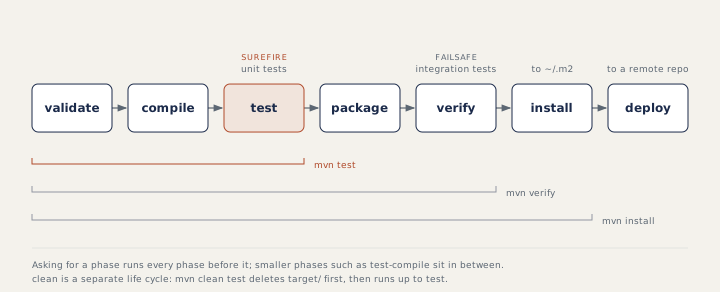
mvn test            # compile main and test code, run tests with Surefire
mvn clean test      # first delete target/, so no stale classes or reports
mvn verify          # also package and run integration tests (Failsafe)
mvn install         # also copy the artifact into the local repository ~/.m2
Failsafe is a sibling plugin for integration tests; a project must set it up before mvn verify runs any. An artifact is the file the build produces, such as a JAR (a zip-like package of compiled Java code). In CI add -B (batch mode) for clean, non-interactive logs. Dependencies are downloaded once into ~/.m2, so caching that folder (keeping it between runs) speeds pipelines up.
Choosing which tests run
By default Surefire runs classes named Test*, *Test, *Tests or *TestCase, so a class called LoginChecks is silently ignored. When a TestNG suite file (an XML file such as testng.xml that lists which classes or groups to run) is configured, the suite decides instead.
mvn test -Dtest=LoginTest                     # one class
mvn test -Dtest=LoginTest#validLogin          # one method
mvn test -Dtest="LoginTest#valid*"            # pattern
mvn test -Dtest=LoginTest,CartTest            # several classes
mvn test -Dgroups=smoke                       # TestNG groups or JUnit 5 tags
mvn test -DexcludedGroups=slow                # leave a group out
mvn test -DsuiteXmlFile=regression.xml        # with the pom above
-Dgroups works with TestNG @Test(groups = "smoke") and with JUnit 5 @Tag("smoke"). When -Dtest is given, Surefire runs the matching tests and ignores the suite files. If a -Dtest pattern matches nothing, Surefire fails with "No tests matching pattern ... were executed!", so a typo cannot produce a green build that tested nothing.
Passing values into tests
mvn test -Dbrowser=firefox -Denv=staging passes system properties (named values given to the program at start) through Surefire to the test JVM (the Java process that runs the tests), where System.getProperty("browser", "chrome") reads them. Pass secrets as environment variables, read with System.getenv, because -D values appear in the command line and logs.
When tests fail
[ERROR] Failures:
[ERROR]   LoginTest.invalidPassword:9 expected: <2> but was: <1>
[ERROR] Errors:
[ERROR]   LoginTest.lockedUser:11 IllegalState boom
[ERROR] Tests run: 3, Failures: 1, Errors: 1, Skipped: 0
[INFO] BUILD FAILURE
A failure is an assertion that did not hold, and an error is an unexpected exception (a crash in the test or the code). Maven then exits with a non-zero code, and that exit code makes the CI step red (shown as failed). Surefire still writes XML reports to target/surefire-reports for Jenkins or GitHub Actions to publish. Three switches to know: -Dmaven.test.failure.ignore=true reports failures but finishes with BUILD SUCCESS, so a later step such as the Jenkins junit step decides; -DskipTests compiles the tests without running them, while -Dmaven.test.skip=true does not even compile them; and -Dsurefire.rerunFailingTestsCount=2 reruns failures and reports tests that pass on a rerun as flaky tests (tests that sometimes pass and sometimes fail with no code change).
Gradle in one paragraph
Gradle is another Java build tool, used in many newer projects. Always run it through the wrapper (a small script kept in the project), so every machine uses the project's version: ./gradlew test runs the tests, ./gradlew test --tests LoginTest filters by class or method, results go to build/test-results/test (XML) and build/reports/tests/test (HTML), and a failing test fails the command with a non-zero exit code.
How to answer in an interview
"In CI we run mvn -B clean test with -Dgroups=smoke on pull requests and a regression suite file nightly, pass the browser and environment as system properties, keep secrets in environment variables, and publish target/surefire-reports." Then be ready to explain each part.
Common mistakes
- Naming a test class so Surefire never picks it up, and not noticing the "Tests run" count drop.
- Confusing
-Dtest(names) with-Dgroups(groups or tags). - Passing passwords with
-D, where they show up in logs. - Relying on default plugin versions that break on a new agent.
Recap
Maven runs phases in order, and mvn test compiles and runs the tests with Surefire. Select tests with -Dtest, -Dgroups or a suite file, pass settings with -D and secrets with environment variables, and let the exit code and the XML reports tell CI what happened.
11 questions0/11 solved
| Status | Question | Difficulty | Asked in |
|---|---|---|---|
| Not started | Which Maven command runs the tests? | Easy | Asked in: Accenture, Capgemini, Infosys +2 |
| Not started | Run one test class or method with Maven | Easy-Medium | |
| Pro+ | Run only the smoke tests with Maven | Easy-Medium | |
| Pro+ | Choose a TestNG suite file from the command line | Medium | Asked in: Accenture, Capgemini, Infosys +2 |
| Pro+ | Failing tests and the Maven exit code | Medium | Asked in: Capgemini, Google, Salesforce +2 |
| Pro+ | -DskipTests versus -Dmaven.test.skip=true | Medium | Asked in: Accenture, Capgemini, Infosys +2 |
| Pro+ | Failures versus errors in the Surefire summary | Medium | Asked in: Capgemini, Google, Salesforce +2 |
| Pro+ | Why does Maven not run my test class? | Medium | |
| Pro+ | Maven: pom.xml, the build life cycle and Surefire | Medium | Asked in: Accenture, Capgemini, Infosys +2 |
| Pro+ | Pass the browser from the command line into tests | Medium | |
| Pro+ | Run one test class with Gradle | Easy-Medium |
The first 2 questions of each topic are free. Pro+ opens every question.