
Framework
Flaky tests and failure triage
Finding why tests fail sometimes, and fixing the cause.
Learn: Flaky tests and failure triage9 minute read
A flaky test passes and fails on the same code with nothing changed. Flaky tests are expensive: people stop trusting red builds (a build is a full run of the tests; red means it failed), rerun until the build goes green (passes), and in the end miss real failures. Triage means looking at a failed test and deciding what kind of problem it is. Interviewers ask how you find and fix flaky tests, and how you decide whether a failure is a bug in the product or a problem in the test.
Usual causes
- Timing: fixed sleeps, missing waits, or waiting for the wrong condition, such as "present" (the element exists in the page) when you need "visible" or "clickable". Animations and spinners belong here too.
- Shared state: tests using the same account or data, tests that depend on order, or a static or global driver in parallel runs.
- Environment: slow or unstable test servers, third-party services, or small headless windows that change the page layout. Headless means the browser runs with no visible window.
- Weak locators (a locator is how a test finds an element): positions such as "the third row", or a locator that sometimes matches a hidden copy first.
- Time and dates: tests that break at midnight, at the end of a month or in another time zone.
- A real race condition in the product (two things happen at once and the result depends on which one finishes first), which is a bug to report, not to hide.
Finding flaky tests
Look at the CI history for tests that flip between pass and fail without code changes, and at retry logs: any test that needed a retry to pass is flaky by definition.
Reproducing
Run the single test many times in the same conditions as CI: headless, the same window size, and in parallel if CI runs in parallel.
Java (TestNG):   @Test(invocationCount = 50)   or   mvn test -Dtest=CartTest#addItem  in a loop
Python (pytest): pytest --count=50 -x tests/test_cart.py::test_add_item   (pytest-repeat plugin)
When it fails, read the evidence: the error type, the screenshot, the logs and the timing. Most causes show up quickly once you have captured one failure.
Fixing the cause
Most fixes are small and specific:
- Replace sleeps (fixed pauses) with explicit waits (the test waits until a condition is true, up to a time limit) for the state a user would see: spinner gone, row visible, button clickable.
- Give each test its own data and account, created in set-up and cleaned up afterwards.
- Keep the driver per test or per thread, never static or global.
- Set a fixed window size for headless runs.
- Use stable locators, ideally test ids such as
data-testid, an attribute that developers add to an element only for tests, agreed with developers. - Control time: compute dates relative to today, or freeze the clock (make the app think it is always the same date) in test environments.
After a fix, run the test many times again. For a flaky test, one green run proves nothing.
Retries and quarantine
Automatic retries, such as TestNG's IRetryAnalyzer or the pytest-rerunfailures plugin, keep a build usable while you fix the cause. They also hide problems if nobody watches them. Keep the retry count low, log every retry, and track the tests that needed one.
Quarantine means moving a known flaky test out of the run that blocks merges (a merge is adding a code change to the main code), with a tag or group. It keeps running in a separate job that does not block anyone. Pair it with a ticket, an owner and a deadline. Deleting the test, or skipping it with no note, loses the coverage (the part of the product the test checked).
Passes locally, fails in CI
Compare the two places: window size and headless mode, machine speed, environment URLs and data, parallel settings, browser and library versions, and missing secrets. Reproduce with the CI settings on your machine, or add logging to the CI job.
When the UI changes often
A test that breaks because the product changed on purpose needs maintenance, and it is not flaky. Keep that maintenance small: agree test ids with developers, keep locators in page objects, set up data through APIs, push most checks down to API and unit tests, and run UI tests on pull requests so the developer who changed the UI sees the break.
Product bug or test problem?
Use the same few questions every time:
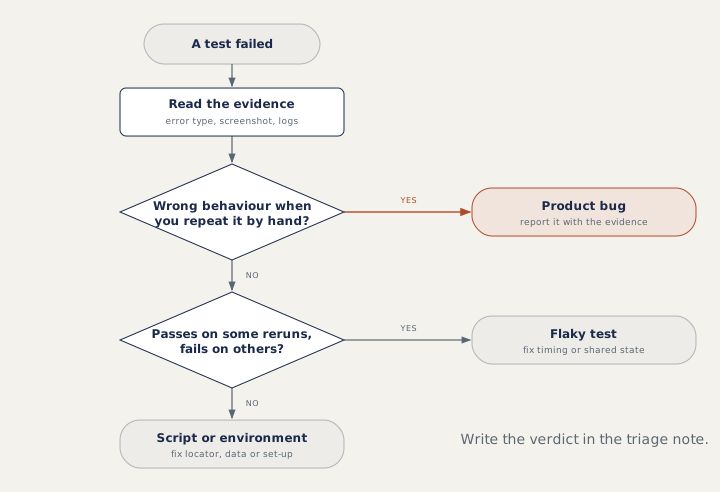
Start from the error type. An assertion with a wrong value ("total was 0.00") points to the product. A locator error, a stale element (the page was redrawn, so the stored element is gone) or a script exception points to the test, unless the screenshot shows the page itself is broken. Repeat the steps by hand in the same environment. If the wrong behaviour happens by hand too, raise a bug with the steps, screenshot and logs. If not, check what changed: a release that moved an element, data that no longer exists, or a timing issue. Write the verdict down so the team keeps trusting the suite.
How to answer in an interview
For "how do you handle flaky tests?", answer in four steps: find them (CI history, retry logs), reproduce them (run many times like CI), fix the cause (usually a wait, shared data or the environment), and prove the fix (many green runs). End with your view on retries: a short-term safety net, logged and tracked, never the fix.
Common mistakes
- Adding a longer sleep and calling the test fixed.
- Setting high retry counts for the whole suite.
- Calling every failure "flaky" without reading the evidence.
- Deleting a flaky test instead of quarantining it with a ticket.
Recap
A flaky test gives different results on the same code. Find it in CI history, reproduce it under CI conditions, and fix the cause; retries and quarantine are only temporary. To triage a failure, read the evidence, repeat the steps by hand, and record the verdict.
8 questions0/8 solved
| Status | Question | Difficulty | Asked in |
|---|---|---|---|
| Not started | What is a flaky test? | Easy | Asked in: Capgemini |
| Not started | How do you find and fix a flaky test? | Medium | Asked in: Capgemini |
| Pro+ | A test passes locally but fails in CI: how do you triage it? | Medium | Asked in: CloudSEK, TCS |
| Pro+ | Is this failure an application bug or a script problem? | Medium | |
| Pro+ | What is the right role for automatic retries? | Medium | Asked in: Accenture, Capgemini, Infosys |
| Pro+ | Common causes of flaky UI tests | Easy-Medium | Asked in: Capgemini |
| Pro+ | Keep tests stable when the UI changes often | Medium | Asked in: Hike, Honeywell |
| Pro+ | Quarantining a flaky test | Medium | Asked in: Capgemini |
The first 2 questions of each topic are free. Pro+ opens every question.