
Your language · Java
Threads and concurrency basics
Threads, shared state and why parallel tests need care.
Learn: Threads and concurrency basics in Java9 minute read
Concurrency means several pieces of work running at the same time, each on its own thread. Testers meet it as soon as they run tests in parallel: tests that pass alone and fail together are usually sharing something they should not. Interviewers ask the basics (threads, synchronisation, which means making threads take turns when they use shared data, and deadlock) and then the practical part: how do you make WebDriver (the Selenium object that controls a browser) safe in a parallel run?
Step 1: threads and their life cycle
A thread is an independent path of execution inside the JVM (the Java Virtual Machine, the program that runs Java code). You can make one from a Runnable lambda (a short function with no name; see Lambdas and streams): new Thread(() -> work()).start(). start() creates the new thread, while calling run() directly just runs the code on the current thread. A thread can be started only once.
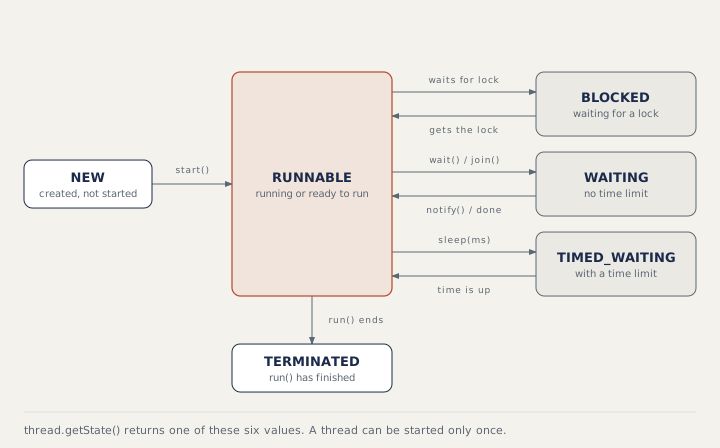
A lock is a rule that lets only one thread use a piece of code or data at a time; the others wait. Thread.sleep(ms) puts a thread in TIMED_WAITING and keeps any locks it holds. obj.wait() must be called while holding the lock on obj; it releases the lock and waits for notify(). A thread that wants a lock another thread holds is BLOCKED; after notify(), a waiting thread must get its lock back, so it can pass through BLOCKED on the way to RUNNABLE.
In real code, use an ExecutorService, which keeps a pool of reusable threads. submit takes a Runnable or a Callable (which returns a value) and returns a Future, a handle to a result that is not ready yet; future.get() waits for the result.
Step 2: race conditions and how to prevent them
Trouble starts with shared mutable state, meaning data that several threads can change. count++ looks like one step but is three: read, add, write. Two threads can read the same value and both write the same result, so one update is lost. This is a race condition, and it shows up only sometimes.
- Best: do not share. Give each thread its own data, or use objects that cannot change.
- Use atomic classes such as
AtomicInteger.incrementAndGet()for counters. Atomic means the operation happens as one step that no other thread can split. - Use concurrent collections such as
ConcurrentHashMap, which are built for use by several threads (see Collections). - Use
synchronizedblocks, which let one thread at a time hold an object's lock.
volatile only makes sure other threads see the newest value of a field; it does not make count++ safe.
import java.util.*;
import java.util.concurrent.*;
import java.util.concurrent.atomic.*;

public class Main {
    public static void main(String[] args) throws Exception {
        AtomicInteger atomic = new AtomicInteger();
        Map<String, Integer> perThread = new ConcurrentHashMap<>();

        try (ExecutorService pool = Executors.newFixedThreadPool(4)) {
            List<Future<Integer>> results = new ArrayList<>();
            for (int t = 0; t < 4; t++) {
                final int id = t;
                results.add(pool.submit(() -> {
                    int local = 0;                       // not shared: safe
                    for (int i = 0; i < 100_000; i++) {
                        atomic.incrementAndGet();
                        local++;
                    }
                    perThread.put("worker-" + id, local);
                    return local;
                }));
            }
            int sum = 0;
            for (Future<Integer> f : results) sum += f.get();
            System.out.println("sum of results: " + sum);
        }
        System.out.println("atomic counter: " + atomic.get());
        System.out.println("workers: " + new TreeMap<>(perThread).keySet());
    }
}
sum of results: 400000
atomic counter: 400000
workers: [worker-0, worker-1, worker-2, worker-3]
A deadlock happens when thread A holds lock 1 and waits for lock 2, while thread B holds lock 2 and waits for lock 1. Neither can go on. Always take locks in the same order, hold them briefly, and use tryLock with a time-out when you can.
Step 3: parallel tests and ThreadLocal
TestNG and JUnit (Java test frameworks) can run tests on several threads. A static WebDriver is then one browser shared by all of them, so one test navigates away while another is typing. The usual fix is one driver per thread with ThreadLocal, which gives every thread its own copy of a value:
public final class DriverManager {
    private static final ThreadLocal<WebDriver> DRIVER = new ThreadLocal<>();

    public static void start(WebDriver driver) { DRIVER.set(driver); }
    public static WebDriver get() { return DRIVER.get(); }
    public static void quit() {
        WebDriver d = DRIVER.get();
        if (d != null) d.quit();
        DRIVER.remove();        // threads are reused by the runner
    }
}
Call remove() in teardown, because test runners reuse threads and an old value would leak into the next test.
Java 21 also has virtual threads, which are very cheap threads managed by the JVM instead of the operating system: Executors.newVirtualThreadPerTaskExecutor(). They help when thousands of tasks mostly wait, such as many API calls during data set-up. They do not speed up CPU-heavy work.
How to answer in an interview
Start from the symptom and work back: "Tests passed alone but failed in parallel because the driver was static, so every thread shared one browser. I moved it into a ThreadLocal in a DriverManager, set it in @BeforeMethod, and quit and removed it in @AfterMethod(alwaysRun = true)." These two TestNG annotations run code before and after every test, and alwaysRun = true makes the second one run even after a failure. For theory, define a race condition with count++ and name one fix.
Common mistakes
- Calling
run()and expecting a new thread. - Using
volatileto fixcount++. - Sharing a static WebDriver, test data list or counter between parallel tests.
- Forgetting
ThreadLocal.remove(). - Using
Thread.sleepto wait for page elements instead of explicit waits.
Recap
A thread goes from NEW to RUNNABLE, may wait or block, and ends TERMINATED. Shared mutable state causes race conditions; avoid sharing, or use atomics, concurrent collections or locks. Take locks in one order to avoid deadlocks. In parallel tests, keep one driver per thread with ThreadLocal and remove it after each test.
8 questions0/8 solved
| Status | Question | Difficulty | Asked in |
|---|---|---|---|
| Not started | start() versus run() | Easy | Asked in: Accenture, Capgemini, Cognizant +2 |
| Not started | Threads and thread safety: synchronisation and deadlocks | Medium | Asked in: Accenture, Capgemini, Cognizant +2 |
| Pro+ | Four threads increment one counter | Medium | Asked in: Accenture, Capgemini, Cognizant +2 |
| Pro+ | ThreadLocal WebDriver for parallel tests | Medium | Asked in: Accenture, Capgemini, Cognizant +2 |
| Pro+ | Thread.sleep() versus wait() | Medium | Asked in: Accenture, Capgemini, Cognizant +2 |
| Pro+ | ExecutorService, Runnable and Callable | Easy-Medium | Asked in: Capgemini, Deloitte |
| Pro+ | What does volatile guarantee? | Medium | Asked in: Accenture |
| Pro+ | Virtual threads in Java 21 | Medium-Hard | Asked in: HCLTech |
The first 2 questions of each topic are free. Pro+ opens every question.