
Your language · Java
Strings
Creating, comparing and changing strings, and why strings cannot be changed in place.
Learn: Strings in Java8 minute read
A String is Java's type for text. Test code is full of it: locators (text that tells Selenium how to find an element on a page), expected messages, URLs, JSON bodies and data read from files. Interviewers ask about strings to check three things: that you know a String never changes, that you compare strings the right way, and that you can build and split text without waste.
Step 1: a String never changes
String is immutable, which means a String object can never change after it is created. Methods such as toUpperCase(), replace(), trim() and concat() return a new object and leave the original alone. If you call title.toUpperCase(); and do not store the result, title stays the same.
The designers had four reasons for this. Identical literals (text typed directly in the code between quotes) can share one object in the string pool, which is only safe if nobody can change it. A path or URL cannot be changed after it has been checked, which helps security. The hash code (a number made from the text, which a HashMap uses to find an entry quickly) is worked out once and cached, so strings make fast HashMap keys. And an object that cannot change can be shared between threads (parts of a program that run at the same time) without locks (rules that let only one thread use something at a time). See Threads. The class is also final, so no subclass can add changeable state.
Step 2: the string pool, and why == fails
The string pool is an area of the heap (the part of memory where Java keeps objects; see Memory) where Java keeps one copy of each string literal. Every literal with the same text points at that one object. So do constants that the compiler joins before the program runs, such as "a" + "b". Text built while the program runs, read from a page or returned by an API is a new object, and new String("test") always makes a new object too.
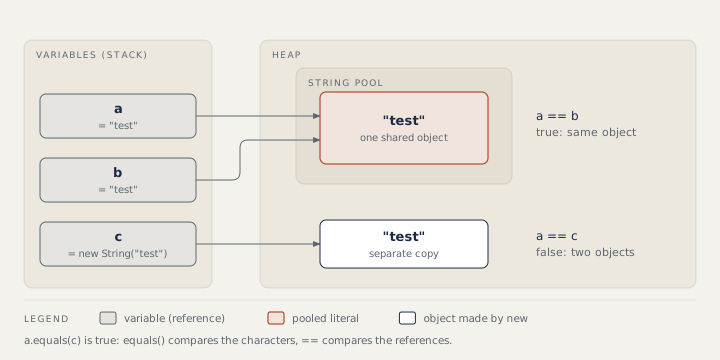
== asks whether two references point at the same object. equals() compares the characters. That is why == sometimes "works" in a small demo with literals and then fails in a real test.
public class Main {
    public static void main(String[] args) {
        String a = "test";
        String b = "test";
        String c = new String("test");
        String part = "te";
        String d = part + "st";              // built at run time

        System.out.println(a == b);          // same pooled literal
        System.out.println(a == c);          // new object
        System.out.println(a == d);          // new object
        System.out.println(a.equals(c) && a.equals(d));
        System.out.println(a == d.intern()); // intern returns the pooled copy

        String title = "Login";
        title.toUpperCase();                 // result thrown away
        System.out.println(title);
        title = title.toUpperCase();
        System.out.println(title);

        String actual = null;
        System.out.println("Welcome".equals(actual));   // no NullPointerException
    }
}
true
false
false
true
true
Login
LOGIN
false
When a value may be null, call equals on the known value, as in "Welcome".equals(actual), or use Objects.equals(a, b). For a check that ignores case, use equalsIgnoreCase.
Step 3: StringBuilder and StringBuffer
Because a String cannot change, every + inside a loop can create a new object. StringBuilder keeps one buffer that grows as needed, so use it when you build text step by step. StringBuffer has the same methods, but they are synchronized (only one thread can use them at a time). That makes it thread-safe and a little slower, and you rarely need it. A single line such as "Hello " + name is fine as it is.
import java.util.List;

public class Main {
    public static void main(String[] args) {
        List<String> cells = List.of("Asha", "QA", "Pune");
        StringBuilder row = new StringBuilder();
        for (String cell : cells) {
            if (row.length() > 0) row.append(" | ");
            row.append(cell);
        }
        System.out.println(row);
        System.out.println(new StringBuilder("level up").reverse());
        System.out.println(String.join(",", cells));
    }
}
Asha | QA | Pune
pu level
Asha,QA,Pune
Step 4: methods you will use in tests
length(),charAt(i),indexOf("x")(-1 when missing),contains,startsWithandendsWith.substring(begin, end): the end index is not included.split(regex): the argument is a regular expression (a pattern for matching text, where some characters such as the dot have a special meaning), so split on a dot with"\\.".strip()removes spaces at both ends, andisBlank()is true for empty or space-only text.String.format("%s has %d items", name, n)builds a message from a pattern.
String message = driver.findElement(By.id("toast")).getText().strip();
assertTrue(message.startsWith("Order"), "Unexpected message: " + message);
String orderId = message.substring(message.indexOf('#') + 1);
How to answer in an interview
Start with the rule, then back it with the pool. For "== or equals?": "equals() compares the text and == compares references. Literals share one pooled object, so == can look right in a demo, but text from a page is a new object, so I always use equals()." For "how many objects does new String("hi") create?": "One new object on the heap, plus a pooled "hi" if that literal is not in the pool yet."
Common mistakes
- Comparing strings with
==. - Calling
s.trim()ors.replace(...)without storing the result. - Calling
actual.equals("x")whenactualmay be null. - Splitting on
"."or"|", which are special characters in a regular expression. The dot matches any character, so the result is not what you expect. - Saying
StringBufferis the faster one.StringBuilderis faster because it has no locking.
Recap
Strings are immutable: every change returns a new object. Literals share one object in the string pool, which has lived in the heap since Java 7. Compare text with equals(), putting the known value first when the other may be null. Build text in loops with StringBuilder, and remember that substring excludes its end index and split takes a regular expression.
9 questions0/9 solved
| Status | Question | Difficulty | Asked in |
|---|---|---|---|
| Not started | == versus equals() on strings | Easy | Asked in: Capgemini, Infosys |
| Not started | Why are strings immutable in Java? | Easy-Medium | Asked in: Capgemini, Infosys |
| Pro+ | String vs StringBuilder vs StringBuffer | Easy-Medium | Asked in: Accenture, Capgemini, Cognizant +1 |
| Pro+ | Calling toUpperCase() without using the result | Easy | Asked in: Capgemini, Infosys |
| Pro+ | String pool, constants and intern() | Medium | Asked in: Capgemini, Infosys |
| Pro+ | Comparing a string that may be null | Easy-Medium | |
| Pro+ | Taking text apart: substring, split and indexOf | Easy-Medium | |
| Pro+ | Ways to reverse a string in Java | Easy-Medium | Asked in: Accenture, Capgemini, Cognizant +1 |
| Pro+ | How many objects does new String("hello") create? | Medium | Asked in: Capgemini, Infosys |
The first 2 questions of each topic are free. Pro+ opens every question.