
SQL
SELECT basics
Choosing columns and rows from one table.
Learn: SELECT basics: choosing columns and rows7 minute read
SQL is the language you use to talk to a database, which is a program that stores data in tables. SELECT is the statement (one complete SQL command) that reads data. A plain SELECT only reads and never changes the data, so it is also the safest statement to run against a shared test database. Almost every SQL round in a testing interview starts here: the interviewer names a table and asks for some columns, then adds one more condition, such as removing repeats or labelling rows. They want to see that you can turn a plain question into a correct query (the text you send to the database) without help.
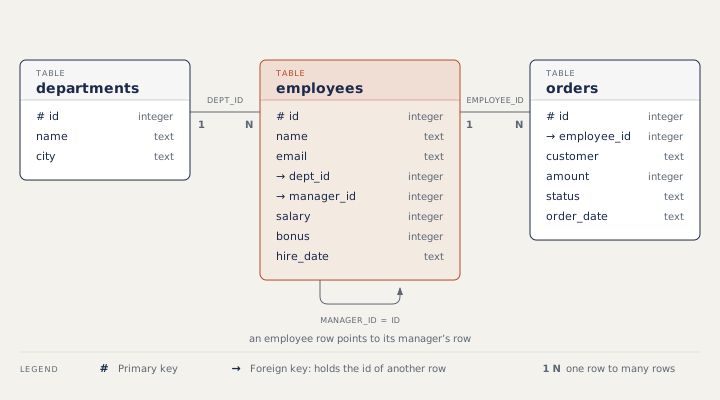
This article and the practice questions use the company sample database. It has three tables. A table is a grid of rows (one per record) and columns (one per piece of information).
Step 1: choose columns
Name the columns you want after SELECT, then the table after FROM. The columns come back in the order you list them.
SELECT name, city FROM departments;name | city Engineering | Bengaluru QA | Pune Sales | Mumbai HR | Pune Support | Chennai
SELECT * returns every column. It is handy when you look at a table by hand. In test code, name the columns. If someone adds or reorders a column later, a test that reads "the third column" breaks, while a test that asks for salary by name keeps working.
SQL keywords are not case-sensitive, so select and SELECT mean the same. Text values go in single quotes, as in 'Pune', and a semicolon ends a statement.
Step 2: compute a value and name it
A result column does not have to exist in the table. You can compute it from other columns and give it a name with AS. That name is called an alias.
SELECT name, salary, salary + 5000 AS new_salary
FROM employees
WHERE dept_id = 2;name | salary | new_salary Neha Gupta | 82000 | 87000 Rohan Mehta | 64000 | 69000 Priya Nair | 64000 | 69000
The table itself does not change; new_salary exists only in this result. WHERE dept_id = 2 keeps only the rows where dept_id is 2. The next topic covers WHERE fully. Tables can have aliases too (FROM employees e), which you will use all the time once you join tables, that is, combine rows from two tables. Joins have their own topic.
Step 3: remove repeats with DISTINCT
Two departments are in Pune, so the first query showed Pune twice. DISTINCT keeps each different row once:
SELECT DISTINCT city FROM departments;city Bengaluru Pune Mumbai Chennai
With several columns, DISTINCT compares whole rows. SELECT DISTINCT dept_id, salary drops a row only when both values repeat together.
Step 4: label rows with CASE
CASE turns a rule into a value. The database checks each WHEN from top to bottom and uses the first one that is true. ELSE covers everything else. Interviewers like it because a business rule, such as a pay band, becomes part of the query.
SELECT name, salary,
       CASE WHEN salary >= 90000 THEN 'High'
            WHEN salary >= 60000 THEN 'Mid'
            ELSE 'Low' END AS band
FROM employees
WHERE dept_id IN (1, 3);name | salary | band Asha Rao | 150000 | High Vikram Shah | 95000 | High Arjun Das | 70000 | Mid Kavya Iyer | 52000 | Low Dev Malhotra | 95000 | High
In the query above, IN (1, 3) means the dept_id is 1 or 3. Because the first true branch wins, the order of branches matters. If the 60,000 rule came first, everyone above 90,000 would be labelled Mid.
The order a query runs in
A clause is one part of a query that starts with a keyword, such as SELECT, FROM or WHERE. You write SELECT first, but the database works through the clauses in another order, and SELECT comes fifth:
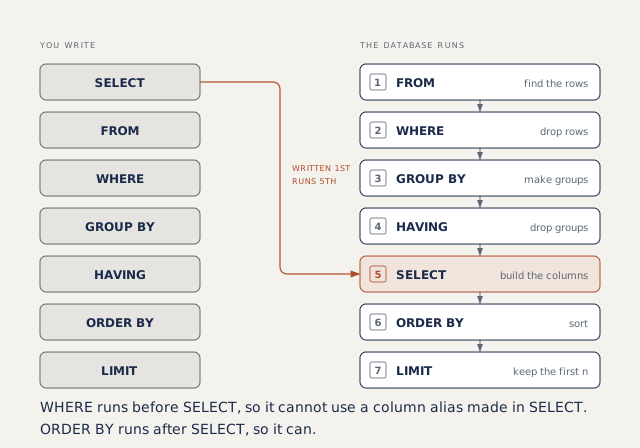
This explains two rules. In standard SQL, MySQL and PostgreSQL, WHERE cannot use an alias made in SELECT, because SELECT has not run yet. (SQLite allows it, but do not count on that in an interview.) ORDER BY runs after SELECT, so it can use the alias.
Dates on this page
The practice questions run on SQLite, a small database program. MySQL and PostgreSQL are two other popular ones. SELECT, WHERE, joins and grouping are written the same way in MySQL and PostgreSQL. Date functions differ the most. Here, dates are text in the form YYYY-MM-DD. SQLite counts days with julianday, MySQL uses DATEDIFF(later, earlier), and PostgreSQL subtracts two DATE values.
SELECT name, hire_date,
       julianday('2026-01-01') - julianday(hire_date) AS days
FROM employees
WHERE id <= 3;name | hire_date | days Asha Rao | 2018-03-01 | 2863 Vikram Shah | 2020-07-15 | 1996 Neha Gupta | 2021-01-10 | 1817
How to answer in an interview
First repeat the question in your own words: which table, which columns, in which order. Then write the query and say what each part does as you go. If you are asked "why not SELECT *?", say that named columns keep a test working when the table changes, and that the query moves less data.
Common mistakes
- Returning extra columns, or the right columns in the wrong order.
- Thinking DISTINCT applies only to the first column.
- Putting a wide CASE branch before a narrow one, so the narrow one never matches.
- Using a SELECT alias in WHERE.
Recap
SELECT picks columns and FROM picks the table. AS names a computed value, DISTINCT removes repeated rows, and CASE turns a rule into a value. The database runs FROM before SELECT. The next topic adds WHERE and ORDER BY, which choose and sort the rows.
7 questions0/7 solved
| Status | Question | Difficulty | Asked in |
|---|---|---|---|
| Not started | Name and city of every department | Easy | Asked in: TCS, Wipro |
| Not started | Each department city once | Easy | |
| Pro+ | Salary after a fixed raise | Easy | |
| Pro+ | Pay band with CASE | Easy-Medium | Asked in: Accenture |
| Pro+ | Days from hire date to a fixed date | Medium | Asked in: TCS |
| Pro+ | In which order are the clauses of a query processed? | Medium | Asked in: Bitkernel |
| Pro+ | What does DISTINCT apply to with two columns? | Easy-Medium |
The first 2 questions of each topic are free. Pro+ opens every question.