
CI/CD and tools
Docker
Images, containers and running browsers and tests in containers.
Learn: Docker for testers: images, containers, Compose and Selenium Grid8 minute read
Docker packages a program together with everything it needs (the language runtime that runs it, libraries, settings) so it runs the same way on any machine. For testers that means every run gets the same browser version, the same language runtime and the same libraries, on a laptop and on any CI agent (a machine that runs automatic builds; see the Jenkins topic). Interviewers ask what images and containers are, how you would run tests or a browser grid in containers, and what goes wrong. This article covers those basics with files that were built and checked with Docker.
Images and containers
An image is a read-only template: files, settings and a default command. A container is a running (or stopped) instance created from an image, and one image can start many containers. Containers share the host's operating system kernel (the core part of the system), which makes them much lighter and faster to start than virtual machines (full computers simulated in software). Anything written inside a container is lost when it is removed, unless it goes to a folder shared with your machine, called a volume (attaching it is called mounting).
Running a browser in a container
docker run -d -p 4444:4444 --shm-size=2g selenium/standalone-chrome:4.45.0
This starts Selenium Grid (a server that starts browsers for your tests) with Chrome inside. -d runs it in the background; -p 4444:4444 maps port 4444 on your machine to port 4444 in the container (a port is a numbered door of a program on a computer); --shm-size=2g gives the browser enough shared memory, without which Chrome can crash; and the full tag (the part after the colon) pins the Selenium and browser versions. Tests then create a RemoteWebDriver (a Selenium object that controls a browser on another machine) pointing at http://localhost:4444. The Grid needs a few seconds to start, and it is ready when http://localhost:4444/status reports "ready": true.
A Dockerfile for a test suite
FROM python:3.12-slim
WORKDIR /tests
COPY requirements.txt .
RUN pip install --no-cache-dir -r requirements.txt
COPY . .
CMD ["pytest", "--junitxml=reports/junit.xml"]
FROMpicks the base image (the image you start from); pin its version.RUNexecutes while the image is built, and its result is saved in the image.CMDis the default command when a container starts. Arguments after the image name replace it:docker run shop-tests pytest -m smoke.- Copying
requirements.txtbefore the rest of the code lets Docker reuse the cached install layer when only test files change, so rebuilds are fast. A layer is the saved result of one Dockerfile line.
Build and run, keeping the reports on your machine:
docker build -t shop-tests .
docker run --rm -v "$PWD/reports:/tests/reports" shop-tests
A Java suite looks the same with a JDK and Maven base image, copying pom.xml first and running mvn -B test.
Several containers with Docker Compose
services:
  chrome:
    image: selenium/standalone-chrome:4.45.0
    shm_size: 2gb
    ports:
      - "4444:4444"
  tests:
    build: .
    depends_on:
      - chrome
    environment:
      SELENIUM_URL: http://chrome:4444
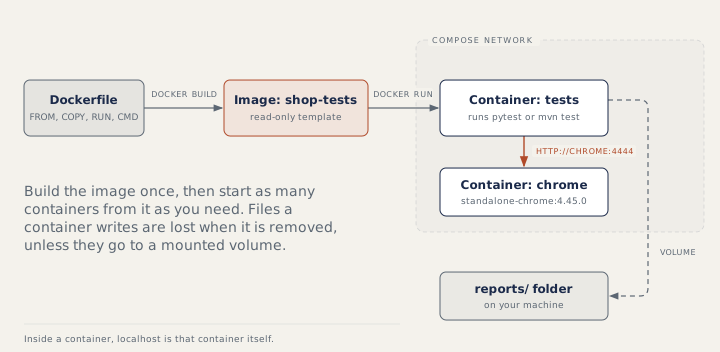
Docker Compose starts several containers from one file. It puts both services on one network where each is reachable by its service name. Inside the tests container, localhost is the tests container itself, so the tests must use http://chrome:4444. The ports entry is only for reaching the Grid from your machine. depends_on only controls start order: Compose waits until chrome is running, not until it is ready. Either give chrome a health check (a command Docker runs to test whether the service works) and use condition: service_healthy, or make the tests poll the status endpoint before the first session.
Selenium Grid with a hub and nodes
For several browsers and more parallel sessions, run a hub (selenium/hub) and node containers (selenium/node-chrome, selenium/node-firefox). The hub is the one entry point, and a node is a container with a browser. Each node finds the hub through SE_EVENT_BUS_HOST=selenium-hub and registers over the hub's event bus ports 4442 and 4443 (the channel the parts of the Grid use to talk to each other). Tests connect only to the hub on port 4444, which sends each session to a node with a matching browser. More node containers mean more parallel sessions.
Everyday commands
docker ps                 # running containers (-a for stopped too)
docker logs -f NAME       # what a container prints
docker exec -it NAME sh   # a shell inside a running container
docker stop NAME          # stop it; docker rm NAME removes it
docker compose up -d      # start a Compose setup
docker compose down       # stop and remove it
How to answer in an interview
Define image and container in one sentence each, then describe one setup you could build: a Dockerfile for the suite, Selenium images with pinned tags started by Compose, tests reaching the browser by service name, a readiness wait (wait until Selenium answers), reports saved to a volume, and docker compose down in a clean-up step that runs even when tests fail.
Common mistakes
- Using
localhostinside a container to reach another container. - Expecting
depends_onto wait until Selenium is ready, so the first test fails with "connection refused". - Forgetting
--shm-size, so the browser crashes. - Leaving reports inside the container, where they vanish with it.
Recap
Build an image from a Dockerfile, start containers from it, and keep anything you need on a volume. RUN works at build time and CMD at start. Containers on a Compose network reach each other by service name, and started is not the same as ready. Pin image tags so browser versions never change by surprise.
9 questions0/9 solved
| Status | Question | Difficulty | Asked in |
|---|---|---|---|
| Not started | Docker image versus container | Easy | Asked in: Capgemini, Swiggy |
| Not started | How do testers use Docker? | Medium | Asked in: Capgemini, Swiggy |
| Pro+ | Start a Selenium Chrome container | Easy-Medium | Asked in: Capgemini, Swiggy |
| Pro+ | Read the Dockerfile: RUN versus CMD | Medium | Asked in: Capgemini, Swiggy |
| Pro+ | Read the Compose file: why chrome:4444 and not localhost? | Medium | Asked in: Capgemini, Swiggy |
| Pro+ | Read the Compose file: is Selenium ready when tests start? | Medium-Hard | Asked in: Capgemini, Swiggy |
| Pro+ | Everyday Docker commands for debugging tests | Easy-Medium | Asked in: Capgemini, Swiggy |
| Pro+ | Selenium Grid with a hub and nodes in Docker | Medium-Hard | Asked in: Capgemini, Swiggy |
| Pro+ | Run your UI suite in Docker in CI | Medium-Hard | Asked in: Capgemini, Swiggy |
The first 2 questions of each topic are free. Pro+ opens every question.