
CI/CD and tools
Reading a failed pipeline
Finding the real error in a failed build and what to do next.
Learn: Reading a failed pipeline: finding the real error and what to do next8 minute read
A pipeline is the list of automatic steps (checkout, build, test and so on) that a CI server runs; CI means continuous integration, see the Jenkins topic. A failed pipeline is a CI run that ended red: some step returned an error. Testers are expected to read it, find the cause and say what happens next, so interviewers hand you a log and ask "why did this fail?", or ask how you triage a red nightly run. The skill is the same in both cases: find where it failed, find the first real error, decide what kind of problem it is, and act. This article shows how, with log excerpts in the formats Maven, pytest, Jenkins and GitHub Actions really print.
How the CI server decides "failed"
Every command returns an exit code, a number it gives when it ends: 0 for success, anything else for failure. Maven, Gradle, pytest and Newman all exit with a non-zero code when tests fail, and the CI server marks the step failed. Jenkins prints ERROR: script returned exit code 1; GitHub Actions prints Error: Process completed with exit code 1. The words in the log decide nothing; the exit code does. A script that swallows exit codes can make a failed test run look green.
Step 1: which stage failed?
If the failure came before the tests (checkout, dependency download, compilation), no test ran, and the cause is code, configuration or the agent (the machine that runs the build). If it came during environment set-up (starting the browser, containers or the application under test), look at those. If the tests ran and some did not pass, read the test summary. In Jenkins, later stages are skipped after a failure (Stage "Deploy to staging" skipped due to earlier failure(s)) while post sections still run, so the test reports are usually there to read.
Step 2: read the first real error
The last lines usually just say BUILD FAILURE. Scroll up to the first error and its cause. Some typical ones:
[ERROR] Source option 5 is no longer supported. Use 8 or later.
Compilation (turning the code into something runnable) failed before any test, because the build relies on an old compiler default. Set the Java release and pin the compiler plugin version, which means write down the exact version to use.
No tests matching pattern "LogInTest" were executed!
A -Dtest value matched nothing, usually a typo in a job parameter. Surefire fails on purpose, so the build cannot be green without testing anything.
ImportError while loading conftest '/home/runner/work/shop/shop/tests/conftest.py'.
E   ModuleNotFoundError: No module named 'selenium'
Error: Process completed with exit code 4.
pytest exit code 4 means a usage error (pytest could not start properly) before any test ran: here a package missing from requirements.txt, or no install step on a fresh runner.
SessionNotCreatedException: ... This version of ChromeDriver only supports Chrome version 114
Current browser version is 120.0.6099.109
The driver (the program that controls Chrome) and the browser have different versions, so no session starts. Pin both in a container image (a packaged setup, see the Docker topic) or let Selenium Manager (a Selenium feature that downloads the matching driver) pick the driver.
Failed to establish a new connection: [Errno 111] Connection refused
Nothing listened at that host and port: the Grid or application is not up yet, or the address is wrong, for example localhost inside a container.
Step 3: read the test summary
[ERROR] Tests run: 120, Failures: 2, Errors: 1, Skipped: 3
Failures are assertions that did not hold (the expected and actual values are printed), and errors are unexpected exceptions (crashes) such as a missing element. Skipped tests did not run; check whether that was intended. For pytest, the short summary lists each FAILED and ERROR with its node id (the full name of the test), and the exit code tells you whether tests failed (1), nothing was collected (5), or the run broke before testing (2, 3 or 4).
Step 4: classify and act
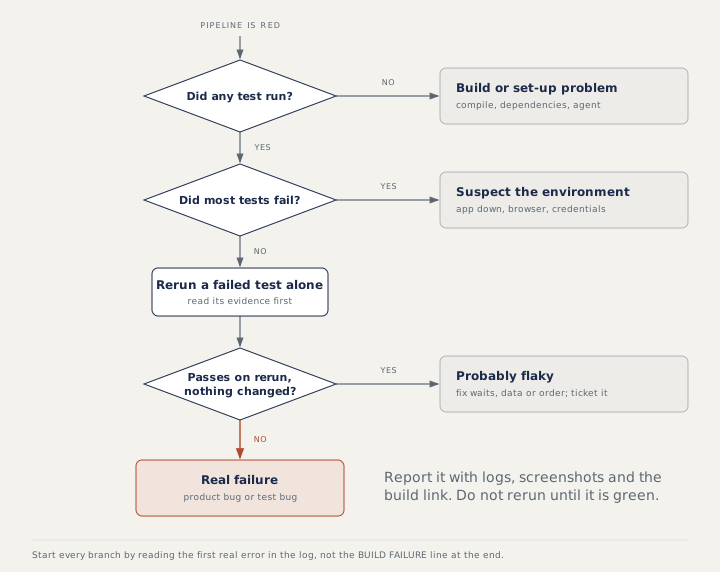
When almost everything failed, suspect the environment: the application is down, a URL is wrong, credentials expired, or test data is missing. When a few tests failed, compare with the changes since the last green run (the last run where everything passed), in both the product and the test code, and read each failure's evidence. A product bug gets a ticket with steps, logs, screenshots and the build link; a test bug gets fixed now, because it blocks everyone; an environment problem goes to its owners with the exact error. Post a short status for the team, and if a test must be quarantined (switched off for a while so it stops blocking others), do it with a ticket (a task in a tracker such as Jira) and an owner, never silently.
How to answer in an interview
Use the steps as your structure: where did it fail, what is the first real error, what does the pattern say, and what do you do about it. When given a log, quote the line that proves your answer, such as the version mismatch message.
Common mistakes
- Reading only the last line of the log.
- Rerunning until the pipeline turns green.
- Calling an environment outage a test failure, or the other way round.
- Ignoring skipped tests and a drop in "Tests run".
Recap
The exit code decides red or green. Find the failed stage, read the first real error, use the summary to separate failures from errors, then let the pattern guide you: nothing ran means build or set-up, everything failed means environment, a few failures mean specific changes or flaky tests (tests that sometimes pass and sometimes fail). A red build should always mean "look now".
10 questions0/10 solved
| Status | Question | Difficulty | Asked in |
|---|---|---|---|
| Not started | How does the CI server know a step failed? | Easy | Asked in: Capgemini, Google, Salesforce +2 |
| Not started | Read the log: why did the build fail? | Easy-Medium | Asked in: Capgemini, Google, Salesforce +2 |
| Pro+ | Read the Maven summary: how many tests did not pass? | Easy-Medium | Asked in: Capgemini, Google, Salesforce +2 |
| Pro+ | Read the GitHub Actions log: what is the fix? | Easy | Asked in: Capgemini, Google, Salesforce +2 |
| Pro+ | Read the log: the build fails before any test runs | Medium | Asked in: Capgemini, Google, Salesforce +2 |
| Pro+ | Read the Jenkins log: "No tests matching pattern" | Medium | Asked in: Capgemini, Google, Salesforce +2 |
| Pro+ | Read the Jenkins log: what happened to the deploy? | Easy-Medium | Asked in: Capgemini, Google, Salesforce +2 |
| Pro+ | Read the log: connection refused to port 4444 | Medium | Asked in: Capgemini, Google, Salesforce +3 |
| Pro+ | The nightly pipeline is red. What do you do? | Medium | Asked in: Capgemini, Google, Salesforce +2 |
| Pro+ | How are your tests wired into CI/CD, and how reliable is the feedback? | Medium-Hard | Asked in: Capgemini, Google, Salesforce +2 |
The first 2 questions of each topic are free. Pro+ opens every question.